Axel YouPlay 2026: A Complete Guide to Interactive Video Playback and Media Presentation
In today’s digital media environment, organizations need reliable solutions for video playback, media management, and audience engagement. Axel YouPlay is designed to simplify the process of delivering high-quality video content while providing users with an efficient and flexible playback experience. Whether you’re working in broadcasting, education, corporate communications, or digital content distribution, Axel YouPlay offers tools that help streamline media presentation and playback workflows.
This guide explores how to use Axel YouPlay, its key features, advantages, limitations, and the best scenarios where it can deliver maximum value. If you’re searching for a professional media playback platform that combines usability with performance, this overview will help you understand what Axel YouPlay brings to the table.
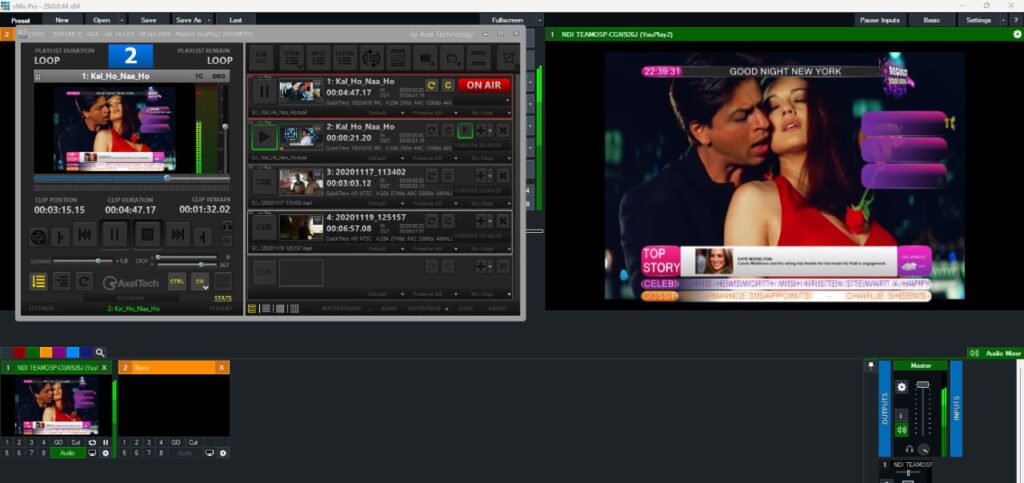
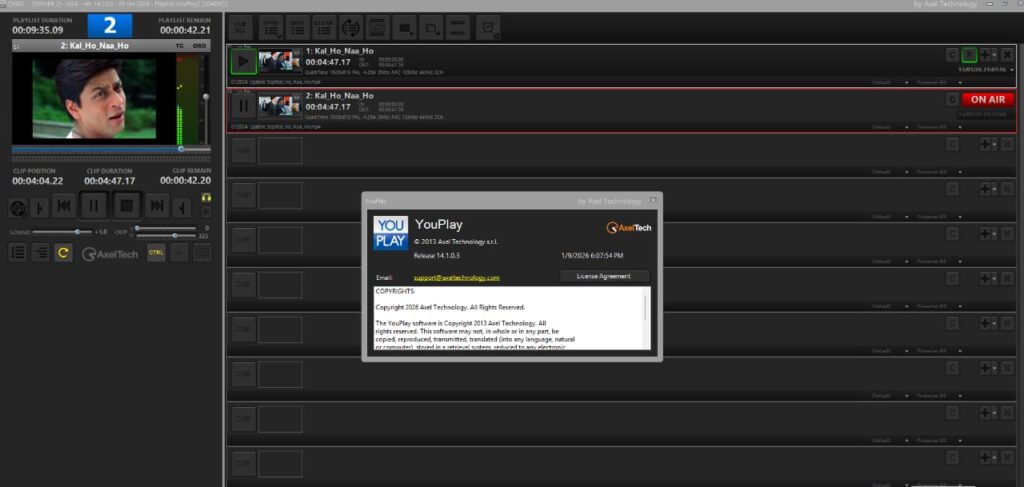
Step 1: Create a New Project
Getting started with Axel YouPlay begins by creating a new project. The platform is designed to make project creation straightforward, allowing users to organize media assets and playback settings from the beginning.
When creating a project, users typically define project parameters such as playback requirements, media categories, content organization methods, and display preferences. Establishing a well-structured project helps improve workflow efficiency later in the process. Whether managing a single presentation or a large collection of media assets, starting with a properly configured project ensures smoother operation and easier content management.
For beginners, the project creation interface is generally intuitive, reducing the learning curve and helping users become productive quickly.
Step 2: Import Media / Setup
After creating a project, the next step is importing media files and configuring the playback environment. Axel YouPlay supports the organization of various media formats, making it suitable for diverse content requirements.
Users can import videos, audio files, graphics, and supporting media assets into the project workspace. During setup, media files can be categorized into folders, playlists, or collections to improve accessibility. Proper organization is especially important when handling large media libraries or preparing content for live presentations.
Additional setup options may include defining playback rules, configuring display settings, selecting output destinations, and adjusting user permissions. Taking time to properly organize and configure media assets can significantly improve overall productivity and content delivery performance.
Step 3: Main Workflow
The core workflow within Axel YouPlay revolves around managing, organizing, and delivering media content efficiently. Once assets are imported, users can arrange content according to their presentation or playback needs.
A typical workflow involves reviewing media files, creating playlists, organizing content sequences, and preparing playback schedules. Users can quickly access assets through structured libraries, reducing the time required to locate specific files during production or presentation.
One of the strengths of Axel YouPlay is its ability to support streamlined media operations. Teams can manage content libraries, coordinate playback activities, and ensure that media assets are delivered consistently. This makes the platform particularly useful for environments where reliable video presentation and media accessibility are essential.
Step 4: Add Features (Effects, Tools, and Customization)
Axel YouPlay includes various tools and customization options that enhance the media playback experience. These features allow users to tailor projects according to specific audience requirements and presentation goals.
Common customization capabilities may include:
- Playlist management tools
- Playback controls and automation
- User interface customization
- Media organization features
- Content scheduling options
- Multi-screen playback support
- Access control and permissions management
These features help users create professional presentations while maintaining flexibility in how media content is displayed. Advanced customization options can be particularly valuable for broadcasters, educational institutions, and organizations that require consistent content delivery across multiple environments.
The ability to personalize workflows also helps improve operational efficiency and user experience.
Step 5: Export / Save Output
After finalizing media arrangements and playback configurations, users can save project settings and prepare output for deployment. Axel YouPlay focuses on maintaining content integrity while ensuring smooth playback performance.
Depending on the workflow, users may save project configurations for future use, export playlists, archive media collections, or deploy content directly to presentation systems. Proper project saving practices help maintain consistency across future sessions and reduce the need for repetitive setup tasks.
Regularly saving project versions also provides an additional layer of security and workflow continuity, especially when working with large-scale media libraries.
Best Use Cases for Axel YouPlay
Axel YouPlay can be valuable across multiple industries and content delivery environments. Some of the most effective use cases include:
Corporate Communications
Organizations can use Axel YouPlay to manage internal presentations, training materials, executive communications, and digital signage content.
Education and Training
Educational institutions can organize video lectures, training programs, and learning materials for efficient playback and content delivery.
Broadcasting and Media Production
Media professionals can utilize the platform for content management, playlist creation, and reliable playback operations.
Events and Presentations
Event organizers can manage multimedia content, presentations, promotional videos, and audience-facing displays through a centralized workflow.
Digital Content Libraries
Companies with extensive video archives can benefit from organized asset management and streamlined media access.
Advantages and Limitations
Like any media platform, Axel YouPlay offers both strengths and areas where users should evaluate suitability based on their specific requirements.
Advantages
- User-friendly project organization
- Efficient media asset management
- Flexible playback controls
- Scalable for various project sizes
- Suitable for professional media environments
- Supports streamlined content workflows
- Improves accessibility of media libraries
- Helpful for collaborative content management
Limitations
- Advanced features may require initial training
- Performance can depend on hardware resources
- Some specialized workflows may need additional integration tools
- Large media libraries require careful organization
- New users may need time to explore all available customization options
Alternatives to Axel YouPlay
Depending on organizational requirements, users may also consider alternative media playback and asset management solutions.
Popular alternatives include:
- VLC Media Player
- Kodi
- Plex
- BrightSign software solutions
- MediaPortal
- PlayBox Technology systems
- Ross Video media management tools
- Cinegy media solutions
Each alternative offers different strengths in terms of scalability, asset management, automation, and enterprise-level deployment.
Frequently Asked Questions (FAQs)
What is Axel YouPlay used for?
Axel YouPlay Download is primarily used for media playback, content organization, video presentation, and media asset management across professional environments.
Is Axel YouPlay suitable for beginners?
Yes. While advanced features may require some learning, the platform generally provides an accessible workflow for new users.
Can Axel YouPlay manage large media libraries?
Yes. The software is designed to help users organize, manage, and access extensive collections of media assets efficiently.
Who benefits most from Axel YouPlay?
Broadcasters, educators, corporate teams, event organizers, and media professionals can benefit from its content management and playback capabilities.
Does Axel YouPlay support workflow customization?
Yes. Users can configure playback settings, content organization methods, and project structures to suit their specific operational requirements.
Conclusion
Axel YouPlay is a versatile media playback and content management solution that helps organizations streamline video delivery and asset organization. Its combination of project management capabilities, playback controls, customization features, and scalable workflows makes it suitable for a wide range of professional applications.
Whether you’re managing educational content, corporate presentations, broadcasting operations, or digital media libraries, Axel YouPlay provides tools that simplify content handling while maintaining reliable playback performance. By understanding its workflow, features, advantages, and limitations, users can determine whether Axel YouPlay is the right solution for their media management and presentation needs.
Download
Telegram ID
eMail