Easy OnAir NDI 0.9.2.17: A Complete Guide to Professional NDI-Based Live Video Production
Table of Contents
In today’s fast-paced broadcasting and live streaming industry, efficient video production tools are essential for delivering high-quality content. Easy OnAir NDI is a powerful solution designed to simplify IP-based video workflows by leveraging NDI (Network Device Interface) technology. Whether you’re managing a television station, corporate live stream, online broadcast, or educational production, Easy OnAir NDI provides a streamlined platform for handling video sources across a network without requiring complex hardware infrastructure.
The software allows users to capture, manage, switch, and distribute video feeds over standard IP networks. Its user-friendly interface makes it accessible to beginners, while its advanced capabilities satisfy the requirements of professional broadcasters. This guide explores how Easy OnAir NDI works, its key features, advantages, limitations, and the best scenarios where it can be used effectively.
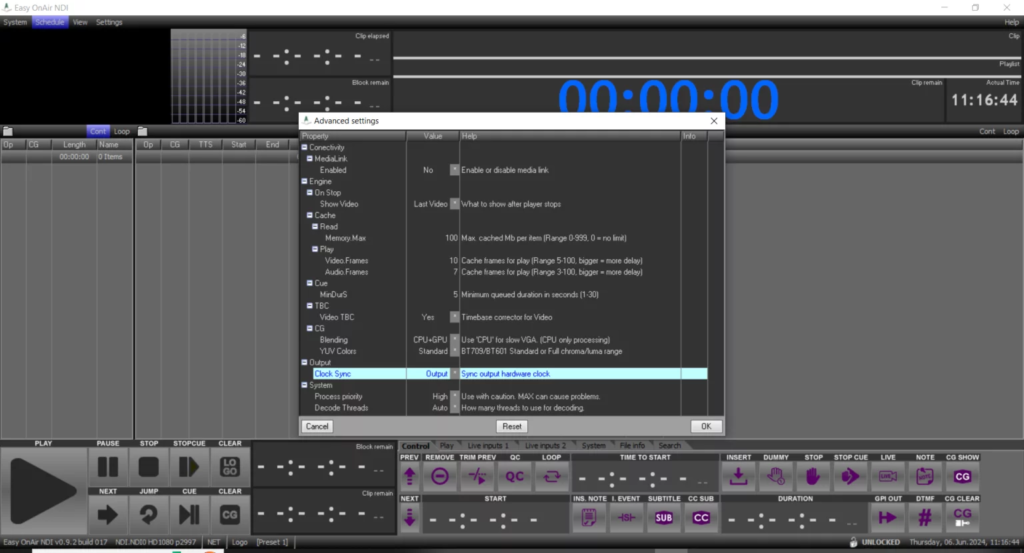
Step 1: Create a New Project
Getting started with Easy OnAir NDI is straightforward. After launching the software, users can create a new project by selecting the desired production settings, including video resolution, frame rate, and network configuration. The project dashboard serves as the central workspace where all video sources, scenes, and output settings are organized.
A well-configured project helps ensure smooth operation throughout the production process. Users can customize project parameters based on their broadcasting requirements, whether producing a live stream, television program, or corporate presentation. Proper planning during this stage reduces workflow interruptions and improves overall production efficiency.
Step 2: Import Media / Setup
Once the project is created, the next step involves importing media and configuring network sources. Easy OnAir NDI automatically detects compatible NDI devices available on the local network, making source integration quick and convenient. Cameras, video servers, graphics systems, and remote production devices can all be connected through NDI technology.
In addition to live sources, users can import video clips, images, logos, and audio files to enhance their productions. Organizing assets into categories simplifies project management and allows operators to quickly access content during live broadcasts. Proper setup at this stage ensures reliable performance and seamless communication between devices.
Step 3: Main Workflow
The core workflow of Easy OnAir NDI revolves around managing multiple video streams and creating professional-quality productions. Users can switch between sources, monitor feeds, and control broadcast outputs from a centralized interface. This makes it ideal for live events, news production, sports coverage, and online streaming.
Real-time switching capabilities allow operators to transition smoothly between cameras and media sources. The software’s intuitive controls reduce the learning curve, enabling production teams to focus on content creation rather than technical complexity. With efficient source management and network-based video transport, production workflows become faster and more flexible.
Step 4: Add Features (Effects, Tools, and Customization)
Easy OnAir NDI includes various tools that enhance production quality and provide creative flexibility. Users can add overlays, lower-thirds, logos, text elements, and graphical branding to create a polished broadcast appearance. These customization options help maintain visual consistency across productions.
Additional production tools may include source monitoring, audio management, scene presets, and transition effects. Operators can customize layouts to match specific broadcasting needs, allowing efficient control over complex productions. Such features make Easy OnAir NDI a practical solution for organizations seeking professional broadcast capabilities without excessive complexity.
Step 5: Export / Save Output
After completing production, Easy OnAir NDI offers multiple output options to suit different distribution requirements. Users can stream content directly to online platforms, send feeds to broadcast systems, or distribute video across NDI-enabled networks. The flexibility of output formats makes it suitable for both traditional and digital broadcasting environments.
Projects can also be saved for future use, allowing producers to reuse configurations and streamline recurring productions. Reliable output management ensures viewers receive high-quality video content with minimal latency and consistent performance throughout the broadcast.
Best Use Cases for Easy OnAir NDI
Easy OnAir NDI is versatile and can be used in a variety of professional environments. Some of its most common applications include:
- Live television production
- Corporate webinars and presentations
- Educational and e-learning broadcasts
- Sports event coverage
- Church and worship streaming
- Remote video production workflows
- Online content creation and streaming
- Newsroom and studio operations
Organizations looking for a network-based video production solution often choose Easy OnAir NDI because it reduces hardware dependency while maintaining professional-quality results.
Advantages and Limitations
Advantages
One of the biggest strengths of Easy OnAir NDI is its ability to transmit high-quality video over existing network infrastructure. This reduces the need for extensive cabling and specialized video routing equipment, making installations more cost-effective and scalable.
Additional advantages include:
- Easy integration with NDI-compatible devices
- User-friendly interface
- Flexible live production workflow
- Reduced hardware requirements
- Real-time video transport
- Efficient multi-source management
- Suitable for both small and large productions
- Supports modern IP-based broadcasting environments
Limitations
Despite its benefits, Easy OnAir NDI has some limitations that users should consider before deployment. Since the software relies heavily on network performance, poor network infrastructure can affect video quality and reliability.
Other potential limitations include:
- Requires stable and high-speed network connections
- Learning curve for users unfamiliar with NDI workflows
- Performance depends on system hardware resources
- Large-scale productions may require advanced network planning
- Compatibility considerations with certain legacy broadcast systems
Understanding these limitations helps organizations prepare appropriate infrastructure for optimal performance.
Alternatives to Easy OnAir NDI
Several alternatives offer similar functionality for live production and NDI-based workflows. Depending on specific requirements, users may consider:
- vMix
- OBS Studio with NDI support
- TriCaster systems
- Wirecast
- Livestream Studio
- Vizrt production solutions
- XSplit Broadcaster
- Streamlabs Desktop
Each platform offers different strengths in terms of features, scalability, and pricing, making it important to evaluate production needs before selecting a solution.
Frequently Asked Questions (FAQs)
What is Easy OnAir NDI?
Easy OnAir NDI 2026 is a video production and broadcasting solution that utilizes NDI technology to transport video, audio, and metadata across IP networks.
Who should use Easy OnAir NDI?
The software is suitable for broadcasters, content creators, educational institutions, corporate organizations, and live event production teams.
Does Easy OnAir NDI support multiple video sources?
Yes. Users can connect and manage multiple NDI-compatible sources simultaneously within a single production workflow.
Is Easy OnAir NDI suitable for live streaming?
Yes. The platform is designed for live production and can be used for online streaming, broadcasting, and network video distribution.
What are the hardware requirements?
Requirements vary depending on project complexity, number of video sources, and desired output quality. A modern multi-core processor and reliable network infrastructure are generally recommended.
Why is NDI technology important?
NDI enables efficient video transport over standard IP networks, reducing the need for traditional video cabling and increasing workflow flexibility.
Conclusion
Easy OnAir NDI is a powerful and practical solution for modern video production environments that rely on network-based workflows. By utilizing NDI technology, it simplifies source management, reduces hardware complexity, and enables flexible live broadcasting across a variety of applications. From corporate streaming and educational broadcasts to professional television production, the software provides the tools needed to create high-quality content efficiently.
While proper network infrastructure is essential for optimal performance, the benefits of scalability, flexibility, and streamlined production make Easy OnAir NDI an attractive choice for organizations embracing IP-based broadcasting. For users seeking a reliable and professional NDI production solution, Easy OnAir NDI remains a strong option worth considering.
This version is SEO-friendly, beginner-focused, and uses natural keyword placement with paragraph lengths generally in the 80–100 word range for better readability and search performance.
Download
Telegram ID
eMail