Multisport Scoreboard Pro v3: A Complete Guide to Professional Sports Scoreboard Graphics
Multisport Scoreboard Pro is a powerful sports graphics solution designed for broadcasters, live stream producers, sports clubs, schools, and event organizers who need professional scoreboard overlays for multiple sports. Whether you are producing a football match, basketball tournament, volleyball game, cricket event, or tennis competition, this software helps create attractive and real-time score graphics that improve the viewing experience.
One of the biggest advantages of Multisport Scoreboard Pro is its flexibility. It supports multiple sports with customizable scoreboard templates, team information, timers, player statistics, logos, and match details. Even beginners can quickly learn the workflow, while experienced broadcasters can take advantage of advanced customization features for professional productions. This guide explains how to use the software effectively, its best applications, benefits, limitations, and suitable alternatives.
Step 1: Create a New Project
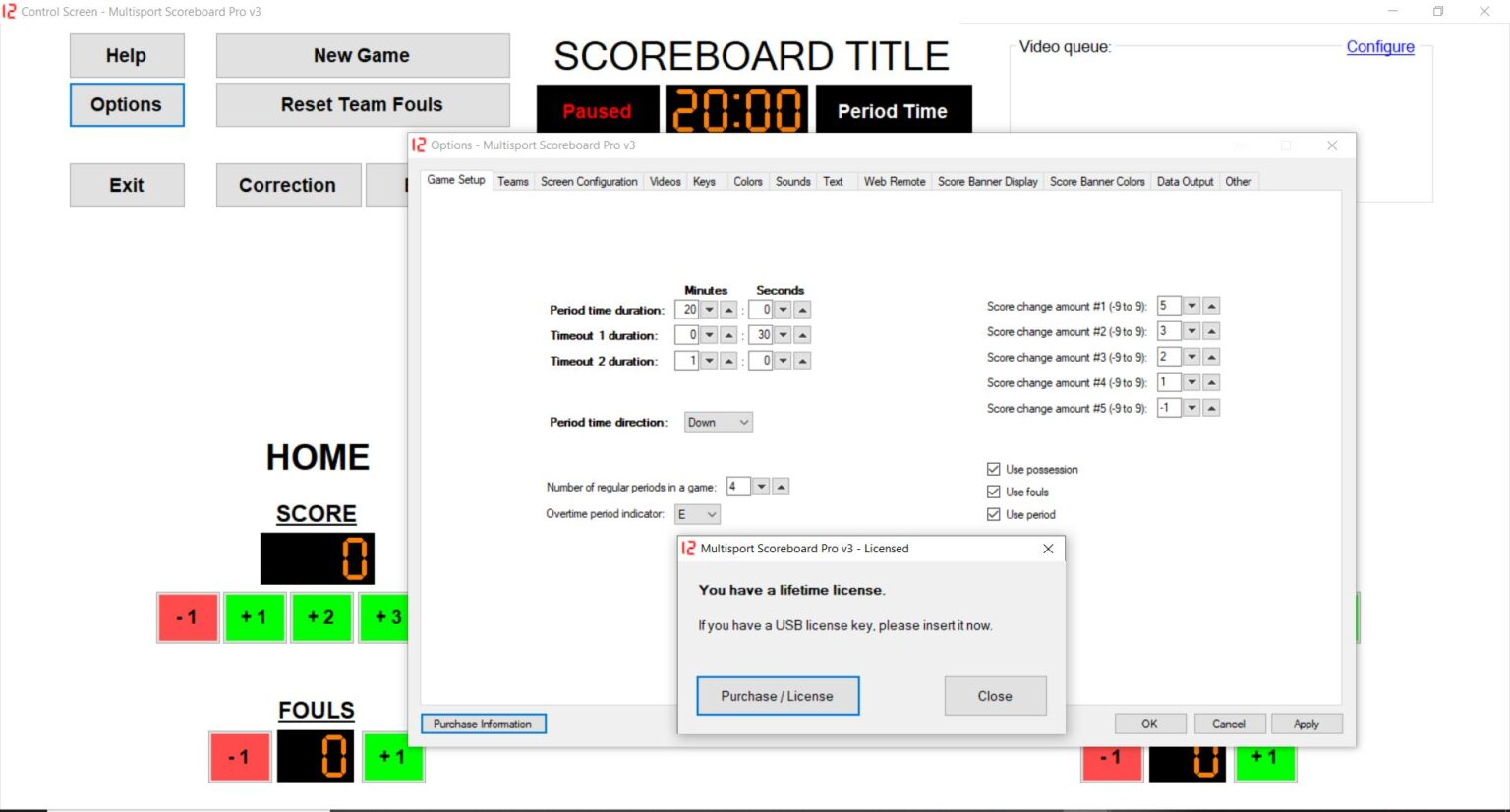
The first step in using Multisport Scoreboard Pro v3 is creating a new project. After launching the software, select the sport you want to cover from the available templates. Since different sports have different scoring systems, choosing the correct project type ensures the scoreboard displays the appropriate fields and match information.
Once the project is created, enter essential details such as team names, tournament title, venue, match officials, and event date. You can also configure game periods, scoring rules, timer settings, and competition formats. Proper project setup saves time during live production and minimizes the chances of making mistakes while broadcasting.
Step 2: Import Media / Setup
After creating your project, import the media elements that will be displayed with the scoreboard graphics. This includes team logos, sponsor images, player photos, competition branding, and custom backgrounds. Organizing these assets before the event allows for a smoother production workflow.
Next, configure your video output settings and connect the software with your production system if required. Verify that fonts, colors, animations, and overlay positions match your broadcast style. Taking a few minutes to complete the setup ensures professional-looking graphics throughout the event.
Step 3: Main Workflow
The primary workflow in Multisport Scoreboard Pro 3 revolves around updating live scores and controlling graphics during the event. As the game progresses, operators can instantly update scores, match timers, player substitutions, fouls, penalties, wickets, sets, innings, or other sport-specific information with minimal delay.
The software is designed to deliver responsive performance, making it suitable for both small local events and professional broadcasts. Operators can quickly switch between different scoreboard layouts while maintaining accurate statistics and synchronized game information. This efficient workflow helps production teams focus on delivering a smooth viewing experience.
Step 4: Add Features (Effects, Tools, and Customization)
One of the strongest features of Multisport Scoreboard Pro is its extensive customization capability. Users can personalize scoreboard layouts according to league branding, sponsor requirements, or broadcast standards. Custom colors, fonts, transitions, animations, and graphic themes can all be adjusted to create a unique visual identity.
Additional tools include player information panels, match statistics, countdown timers, possession indicators, penalty tracking, sponsor logos, lower-thirds, and animated transitions. These professional features enhance audience engagement while giving productions a polished television-style appearance.
Step 5: Export / Save Output
Once your scoreboard configuration is complete, save the project for future matches or tournaments. Saving reusable templates allows operators to prepare future events much faster while maintaining consistent branding across broadcasts.
Depending on your production workflow, Multisport Scoreboard Pro can be configured for live output within compatible broadcasting environments. Always verify scoreboard accuracy and preview graphics before going live to ensure viewers receive reliable and professional match information.
Best Use Cases for Multisport Scoreboard Pro
Multisport Scoreboard Pro is suitable for a wide variety of sporting events and production environments. Its flexibility makes it an excellent choice for organizations that regularly manage different sports throughout the year.
Common use cases include:
- Live television sports broadcasts
- Online sports streaming platforms
- School and college tournaments
- Local sports leagues
- Professional sports clubs
- Indoor and outdoor sporting events
- Basketball competitions
- Football and soccer matches
- Cricket tournaments
- Volleyball championships
- Tennis competitions
- Esports score displays
- Community sporting events
Its ability to adapt to multiple sports makes it a valuable investment for organizations seeking one comprehensive scoreboard solution.
Advantages and Limitations
Advantages
Multisport Scoreboard Pro offers several benefits that appeal to broadcasters and event organizers alike.
- Supports multiple sports in one platform.
- Beginner-friendly interface with an organized workflow.
- Professional-quality scoreboard graphics.
- Real-time score updates with minimal delay.
- Highly customizable layouts and themes.
- Supports team logos, player information, and sponsor graphics.
- Reusable project templates improve efficiency.
- Suitable for both small events and large productions.
- Reliable performance during live broadcasts.
- Flexible enough for different competition formats.
Limitations
While Multisport Scoreboard Pro is a capable solution, users should also understand its limitations.
- Advanced customization may require some learning.
- Initial setup takes time for first-time users.
- Some advanced broadcast workflows may require compatible production hardware or software.
- Larger tournaments benefit from experienced operators for efficient live management.
- Premium features may vary depending on the software edition being used.
Alternatives to Multisport Scoreboard Pro
If you are evaluating multiple scoreboard software solutions before making a decision, several alternatives are worth considering depending on your production requirements.
Popular alternatives include:
- vMix GT Title Designer
- NewBlue Captivate
- Singular Live
- CharacterWorks
- Live Graphics Systems
- CasparCG with custom scoreboard templates
- Ross XPression
- Chyron PRIME
- Vizrt graphics solutions
- Broadcast graphics software with scoreboard modules
Each solution offers different strengths, so comparing features such as customization, supported sports, automation, and integration capabilities is recommended before choosing the best platform.
Frequently Asked Questions (FAQs)
What is Multisport Scoreboard Pro?
Multisport Scoreboard Pro is a professional sports graphics application that creates customizable scoreboard overlays for multiple sports during live broadcasts and streaming events.
Which sports are supported?
The software is designed to accommodate various sports, including football, basketball, volleyball, cricket, tennis, hockey, and many other competitive events, depending on the available templates.
Is Multisport Scoreboard Pro suitable for beginners?
Yes. The software offers an organized interface that allows beginners to learn the basics while also providing advanced features for experienced broadcast professionals.
Can I customize the scoreboard design?
Yes. Users can modify colors, fonts, layouts, animations, logos, sponsor graphics, and other visual elements to match their production style or branding.
Can I reuse projects?
Multisport Scoreboard Pro Saved projects and templates can be reused for future matches, reducing preparation time and maintaining consistency across multiple events.
Is it useful for live streaming?
Yes. Multisport Scoreboard Pro is well suited for live streaming productions, helping operators display accurate scores, timers, player information, and other match graphics in real time.
Conclusion
Multisport Scoreboard Pro is an excellent solution for anyone looking to create professional sports scoreboard graphics for live broadcasts and streaming productions. Its support for multiple sports, customizable layouts, real-time updates, and user-friendly interface make it suitable for schools, clubs, broadcasters, and professional production companies alike.
Whether you are managing a local tournament or producing a large sporting event, Multisport Scoreboard Pro provides the tools needed to deliver clear, accurate, and visually appealing scoreboard graphics. By understanding its workflow—from project creation and media setup to live operation and project saving—you can produce polished sports broadcasts that enhance the viewing experience and maintain professional production standards.
Download
Telegram ID
eMail