PlayWiz PlayCube 8 Channel 2026: A Complete Guide to Professional Broadcast Playout
Whether you manage a television station, cable network, or digital broadcast platform, choosing the right automation system can make a major difference. One powerful solution gaining attention is PlayWiz PlayCube 8 Channel.
Designed for professional broadcast environments, PlayWiz PlayCube 8 Channel offers advanced playout automation, multi-channel management, and stable performance for continuous broadcasting. It helps broadcasters streamline operations, reduce manual workload, and maintain high-quality output without interruptions.
This article covers everything you need to know about PlayWiz PlayCube 8 Channel, including its features, benefits, setup process, and why it is a valuable tool for modern broadcasting.
What is PlayWiz PlayCube 8 Channel?
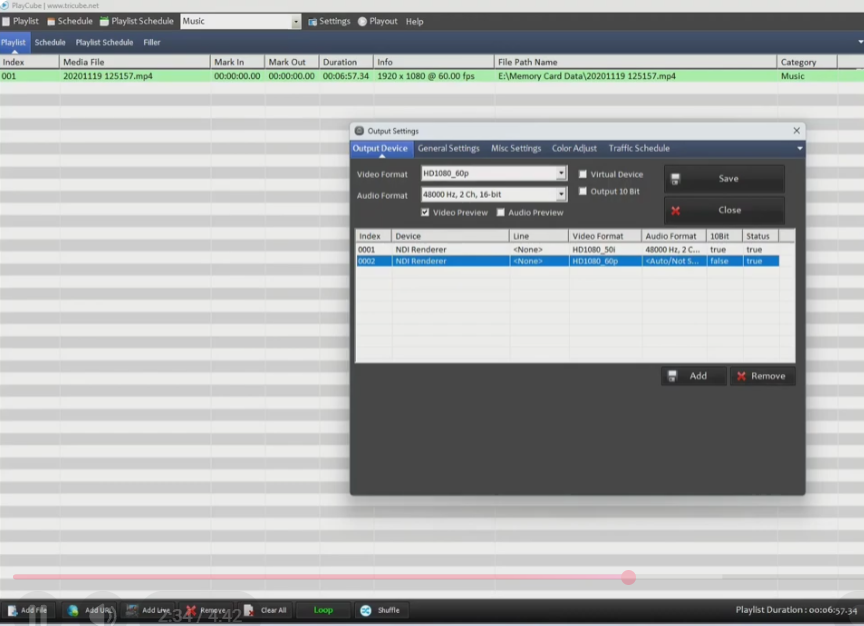
PlayWiz PlayCube 8 Channel is a professional broadcast playout and automation software designed for managing multiple TV channels from a single system. It allows users to schedule, control, and broadcast media content efficiently across up to eight channels simultaneously.
The software is widely used by television stations, IPTV providers, and cable operators who require reliable automation and seamless content scheduling. Its advanced architecture ensures stable operation even during 24/7 broadcasting.
With support for multiple media formats, real-time playlist management, and automated scheduling, PlayWiz PlayCube 8 Channel helps broadcasters maintain professional standards with minimal manual intervention.
Key Features of PlayWiz PlayCube 8 Channel
Multi-Channel Playout Support
One of the strongest advantages of PlayWiz PlayCube 8 Channel is its ability to manage eight separate channels at the same time. This feature is ideal for broadcasters handling multiple stations or content streams from a single control center.
This reduces hardware costs and improves operational efficiency significantly.
Advanced Scheduling and Automation
The software includes powerful scheduling tools that allow users to create daily, weekly, or monthly playlists. Broadcasters can automate program transitions, commercial breaks, and content playback without constant monitoring.
This ensures uninterrupted broadcasting and minimizes human error.
Real-Time Content Management
Operators can make live changes to playlists while the channel is running. This is especially useful for urgent updates, breaking news, or last-minute schedule adjustments.
Real-time control adds flexibility to professional broadcast operations.
High-Quality Video Playback
PlayWiz PlayCube 8 Channel supports smooth playback of high-resolution media files with stable performance. It maintains consistent output quality across all channels, ensuring viewers receive a professional broadcasting experience.
Wide Media Format Compatibility
The software supports a wide range of audio and video formats, making it easier for broadcasters to work with different content types without additional conversion tools.
This saves both time and storage resources.
Graphics and Branding Support
Professional broadcasting requires visual branding, and PlayWiz PlayCube 8 Channel includes support for:
- Logo insertion
- Lower thirds
- Text crawlers
- Breaking news tickers
- Channel branding overlays
These tools help create a polished and professional on-air appearance.
Benefits of Using PlayWiz PlayCube 8 Channel
Improved Broadcast Efficiency
Managing multiple channels manually can be time-consuming and risky. With automation features, broadcasters can focus on content strategy rather than repetitive operational tasks.
This improves overall productivity.
Reduced Operational Costs
Since the software can handle up to eight channels from one system, broadcasters save on hardware investment, staffing, and maintenance expenses.
This makes it a cost-effective long-term solution.
Reliable 24/7 Broadcasting
Continuous broadcasting requires stability and dependability. PlayWiz PlayCube 8 Channel is built for nonstop operation, reducing downtime and ensuring consistent performance.
Reliability is critical in professional broadcasting, and this software delivers it.
Easy Workflow Management
Its organized interface allows operators to manage playlists, schedules, and live content adjustments efficiently. Even teams with moderate technical experience can learn the workflow quickly.
Better Viewer Experience
Smooth transitions, stable playback, and professional graphics all contribute to a better viewing experience for the audience. Viewer satisfaction directly impacts channel credibility and growth.
How to Set Up PlayWiz PlayCube 8 Channel
Step 1: Install the Software
Begin by installing the software on a broadcast-ready system with sufficient hardware resources. A powerful processor, enough RAM, and fast storage are recommended for smooth multi-channel operation.
Proper system requirements ensure stable performance.
Step 2: Import Media Files
Add your video files, advertisements, promos, and other content into the media library. Organizing content into folders helps improve workflow and scheduling efficiency.
Step 3: Create Playlists
Use the scheduling panel to build playlists for each channel. Assign time slots, advertisements, and transition rules according to your broadcast requirements.
This creates a fully automated playout structure.
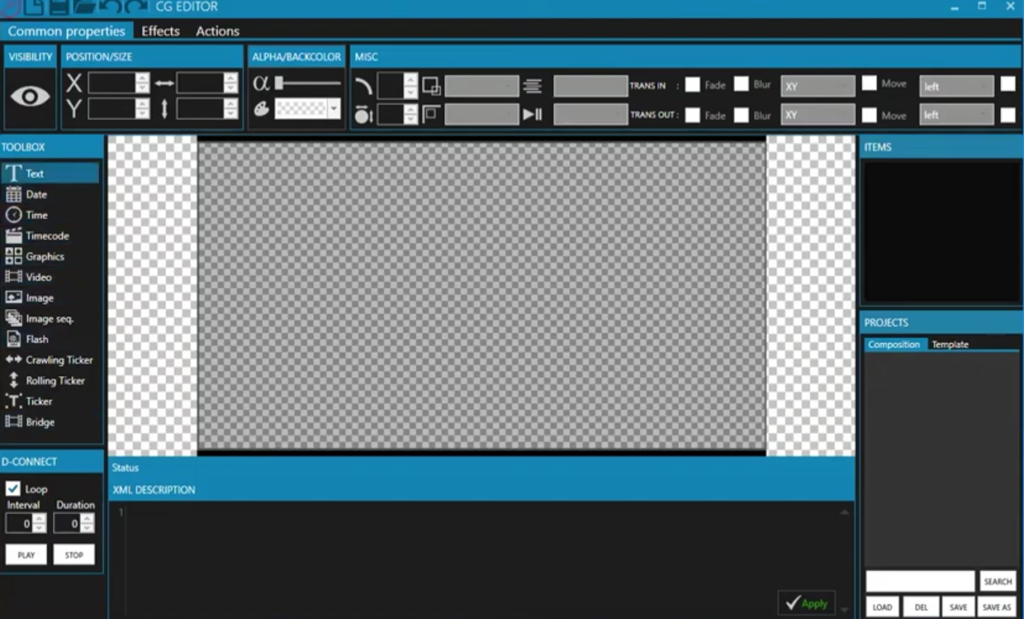
Step 4: Configure Graphics and Branding
Set up channel logos, text crawlers, lower thirds, and emergency message overlays. These elements help maintain consistent branding and professional presentation.
Step 5: Start Broadcasting
Once everything is configured, activate the playout engine and monitor output performance. Operators can still make live changes if needed during active broadcasting.
Who Should Use PlayWiz PlayCube 8 Channel?
This software is ideal for:
- Television stations
- Cable TV operators
- IPTV service providers
- Educational broadcast networks
- Religious channels
- News broadcasting organizations
- Government media departments
- Corporate media production teams
Any organization requiring professional multi-channel playout can benefit from this solution.
Why PlayWiz PlayCube 8 Channel Stands Out
Many playout solutions focus only on basic automation, but PlayWiz PlayCube 8 Channel offers a more complete broadcasting environment. Its multi-channel support, professional graphics integration, stable performance, and flexible scheduling make it a strong choice for serious broadcasters.
The combination of performance and efficiency gives it an advantage in demanding production environments.
It supports both small and large broadcast operations, making it scalable for future growth.
Final Thoughts
PlayWiz PlayCube 8 Channel alternative is a powerful and practical solution for broadcasters looking to improve automation, reliability, and professional output. Its ability to manage eight channels simultaneously makes it especially valuable for growing television networks and digital broadcasting platforms.
From advanced scheduling to real-time control and branding tools, the software offers everything needed for modern playout operations. It helps reduce workload, lower costs, and deliver better content experiences for viewers.
For broadcasters seeking dependable multi-channel automation, PlayWiz PlayCube 8 Channel remains a strong and trusted choice in professional broadcasting technology.
Download
Telegram ID
eMail