Overview of JPlayout With Encoder
In today’s digital broadcasting environment, automation and efficiency are key to delivering consistent content. JPlayout With Encoder is a powerful open-source playout system combined with encoding capabilities, designed for TV channels, streaming platforms, and media professionals.
This solution allows users to schedule, manage, and broadcast video content seamlessly. By integrating encoding directly into the playout workflow, it eliminates the need for additional software, making operations simpler and more cost-effective.
For users looking for a reliable and flexible playout system, JPlayout With Encoder offers a strong balance between performance and usability, especially for small to medium-scale broadcasting setups.
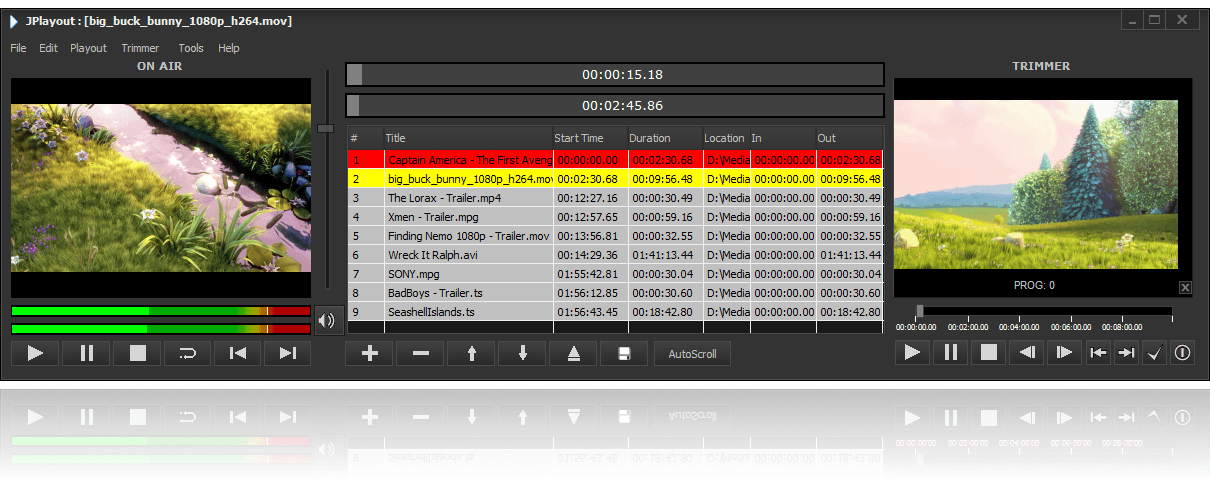
Key Features of JPlayout With Encoder
JPlayout With Encoder comes with a variety of features that make it a practical choice for modern broadcasting.
Integrated Playout and Encoding
- Combines playlist scheduling with real-time encoding
- Reduces the need for third-party tools
Automated Scheduling
- Create playlists for continuous broadcasting
- Supports 24/7 unattended operation
Multi-Format Support
- Works with a wide range of video formats
- Ensures smooth playback without conversion issues
Web-Based Interface
- Control the system remotely via browser
- Simple and accessible interface
Open-Source Flexibility
- Free to use and customizable
- Ideal for developers and advanced users
These features make it a versatile solution for broadcasters looking to streamline their workflow.
What’s New in Latest Version
The latest version of JPlayout With Encoder includes several improvements to enhance performance and reliability.
- Better encoding stability and performance
- Improved playlist management system
- Enhanced compatibility with modern codecs
- Bug fixes and system optimizations
- Updated user interface for easier navigation
These updates ensure smoother broadcasting and a better user experience.
System Requirements
Before installing, ensure your system meets the following requirements.
Minimum Requirements
- Operating System: Linux (preferred) or Windows
- Processor: Dual-core CPU
- RAM: 4 GB
- Storage: 10 GB free space
Recommended Requirements
- Processor: Quad-core CPU or higher
- RAM: 8 GB or more
- Storage: SSD for faster performance
- Network: Stable internet connection for streaming
Since it is lightweight, JPlayout With Encoder can run efficiently on modest hardware.
Installation Guide
Follow these steps to install JPlayout With Encoder:
- Download the software package from a trusted source
- Install required dependencies (especially for Linux systems)
- Run the setup and configure basic settings
- Set up encoding parameters and output destinations
- Launch the system and test playback
Proper configuration is important to ensure stable playout and encoding.
How to Use JPlayout With Encoder: A Quick Start Guide
Step 1: Create a New Project
Start by setting up a new channel or project. Define your broadcast settings, including resolution and output format.
Step 2: Import Media / Setup
Upload your video files and organize them into playlists. Configure input and output settings.
Step 3: Main Workflow (editing/design/etc.)
Arrange your content timeline and schedule playback. Set timing for ads, shows, and transitions.
Step 4: Add Features (effects/tools/customization)
Customize your stream by adding overlays, logos, or graphics. Adjust encoding settings for quality and bitrate.
Step 5: Export / Save Output
Start broadcasting or save your configuration. Monitor the output to ensure smooth playback.
Best Use Cases for JPlayout With Encoder
JPlayout With Encoder is suitable for a variety of applications:
- Internet TV channels
- Community broadcasting stations
- Educational streaming platforms
- Corporate video channels
- Event-based streaming setups
Its flexibility makes it ideal for both beginners and experienced broadcasters.
Advantages and Limitations
Advantages
- Free and open-source solution
- Integrated encoding and playout
- Lightweight and efficient
- Easy remote access via web interface
- Customizable for different workflows
Limitations
- Requires basic technical knowledge for setup
- Limited advanced features compared to premium software
- Better performance on Linux systems
Alternatives to JPlayout With Encoder
If you are exploring other options, consider these alternatives:
- OBS Studio – Free streaming and recording software
- vMix – Professional live production tool
- Wirecast – Advanced broadcasting solution
- PlayBox Neo – Enterprise-level playout system
Each alternative offers different features depending on your needs and budget.
Frequently Asked Questions (FAQs)
What is JPlayout With Encoder used for?
It is used for automating video playout and encoding for broadcasting and streaming.
Is JPlayout With Encoder free?
Yes, it is an open-source solution available for free.
Can beginners use it?
Yes, but some technical knowledge is helpful for setup and configuration.
Does it support live streaming?
Yes, it supports real-time streaming with integrated encoding.
Is it suitable for 24/7 broadcasting?
Yes, it can handle continuous broadcasting with proper setup.
Conclusion
JPlayout With Encoder is a reliable and cost-effective solution for modern broadcasting needs. Its combination of playout automation and encoding makes it a practical choice for users who want a streamlined workflow without relying on multiple tools.
While it may require some technical setup, the flexibility and performance it offers are impressive. Whether you are running an online TV channel or managing a small broadcasting setup, JPlayout With Encoder provides the tools needed for efficient and professional content delivery.
Download
Telegram ID
eMail