Axel CG Plus 2026: A Complete Guide to Features, Workflow, Benefits, and Alternatives Introduction
Axel CG Plus is a professional character generator and broadcast graphics solution designed to help television stations, live production teams, content creators, and media organizations create high-quality on-screen graphics. The software provides tools for generating titles, lower thirds, tickers, animations, logos, and real-time broadcast graphics. Whether you are managing a news channel, sports broadcast, live event production, or corporate presentation, Axel CG Plus offers a streamlined workflow that simplifies graphic creation while maintaining professional broadcast standards.
In today’s competitive media environment, viewers expect visually engaging content. This is where Axel CG Plus becomes a valuable tool. Its flexible design environment, customizable templates, and real-time graphics capabilities make it a popular choice for broadcasters looking to improve production quality without adding unnecessary complexity to their workflow.
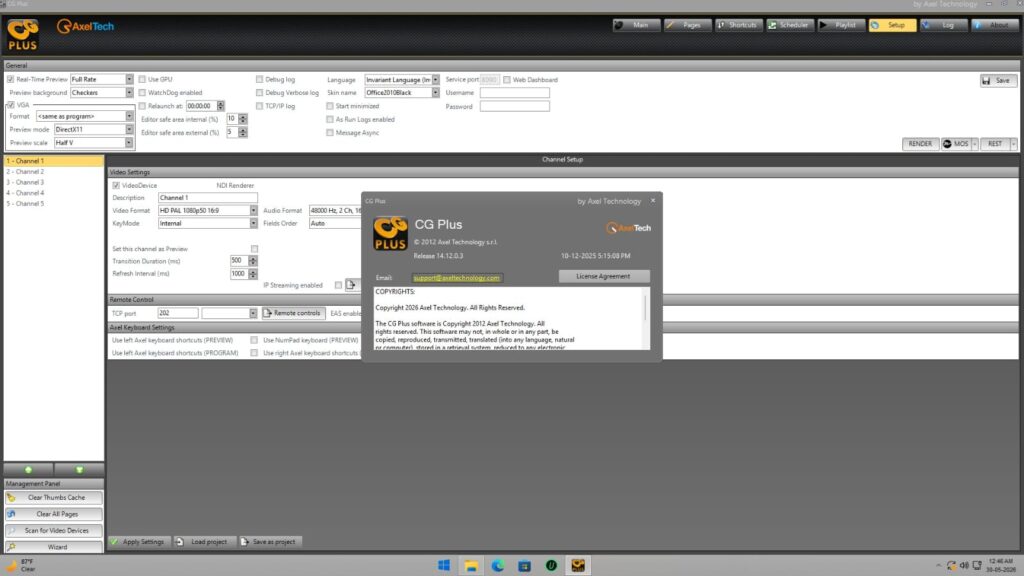
Step 1: Create a New Project
Getting started with Axel CG Plus begins by creating a new project. After launching the software, users can define project settings such as screen resolution, frame rate, output format, and graphics templates. Setting up a project correctly from the beginning ensures smooth operation throughout the production process and minimizes compatibility issues during live broadcasts or final output generation.
A well-organized project structure also improves efficiency. Users can create dedicated folders for graphics assets, templates, logos, and media elements. This organization becomes especially important for larger productions where multiple graphic elements need to be managed and updated quickly. Proper project setup helps maintain consistency across all visual components used in the broadcast.
Step 2: Import Media / Setup
Once the project is created, the next step is importing media assets. Axel CG Plus supports various media formats, allowing users to import images, logos, videos, audio clips, and graphic elements. These assets serve as the foundation for creating professional broadcast graphics and visual presentations.
During the setup phase, users can arrange media libraries, assign categories, and prepare templates for future use. This preparation significantly reduces production time, especially when working on recurring programs or live broadcasts. Organizing media resources effectively ensures quick access to assets whenever updates or modifications are required during production.
Step 3: Main Workflow (Editing and Design)
The core strength of Axel CG Plus lies in its graphics creation and editing workflow. Users can design lower thirds, title sequences, scoreboards, news tickers, promotional graphics, and branding elements using the software’s editing tools. The interface is designed to balance functionality with ease of use, making it suitable for both beginners and experienced broadcast designers.
Graphic elements can be positioned, resized, animated, and customized according to specific production requirements. Text layers, image layers, and animation controls allow creators to build visually appealing graphics that enhance audience engagement. The software also supports real-time graphic updates, making it ideal for live television environments where information changes rapidly.
Step 4: Add Features (Effects, Tools, and Customization)
After creating the basic graphic design, users can enhance their projects with additional effects and customization options. Axel CG Plus offers a variety of tools that help transform simple graphics into professional broadcast-ready visuals. These features improve visual appeal while maintaining clarity and readability on screen.
Popular customization options include:
- Animated transitions
- Dynamic text effects
- Real-time data integration
- Multi-layer graphic compositions
- Custom branding elements
- Scrolling tickers
- Logo animations
- Color and style adjustments
These advanced capabilities allow broadcasters to create unique visual identities that align with their brand while delivering information effectively to viewers.
Step 5: Export / Save Output
Once the graphics are finalized, users can export or save the project in the required format. Axel CG Plus provides flexible output options suitable for television broadcasting, video production, live streaming, and digital media applications. Export settings can be adjusted based on the target platform and technical requirements.
Saving projects regularly ensures that designs can be reused or modified in future productions. Many organizations benefit from maintaining a library of templates and completed projects, which helps reduce production time for recurring broadcasts. Efficient export and project management features contribute to a smoother production workflow and better overall productivity.
Best Use Cases for Axel CG Plus
Axel CG Plus serves a wide range of professional applications across the media and broadcasting industry. Its versatility makes it suitable for both small production teams and large television networks.
Common use cases include:
- Television news broadcasts
- Sports event graphics
- Live event productions
- Corporate presentations
- Educational broadcasts
- Religious programming
- Streaming content creation
- Election coverage graphics
- Weather information displays
- Digital signage applications
Organizations that require real-time graphic updates and professional visual presentation often find Axel CG Plus to be a reliable and efficient solution.
Advantages and Limitations
Advantages
Axel CG Plus offers several benefits that make it attractive for professional broadcasting environments. Its combination of real-time graphics capabilities, customization options, and workflow efficiency allows production teams to create visually impressive content with minimal delays.
Key advantages include:
- Professional broadcast-quality graphics
- Real-time graphic updates
- Flexible customization tools
- Support for multiple media formats
- Efficient template management
- Scalable for different production sizes
- User-friendly interface
- Suitable for live and recorded productions
Limitations
Despite its strengths, Axel CG Plus may not be the perfect solution for every user. Like most professional broadcast software, it may require time to master advanced features and workflows.
Potential limitations include:
- Learning curve for beginners
- Hardware requirements for complex projects
- Advanced features may be unnecessary for simple productions
- Initial setup can take time
- Professional environments may require additional training
Understanding these limitations helps organizations determine whether the software aligns with their production needs and technical capabilities.
Alternatives to Axel CG Plus
While Axel CG Plus is a capable broadcast graphics solution, several alternatives are available depending on specific production requirements and budget considerations.
Popular alternatives include:
- Vizrt
- Chyron PRIME
- NewBlue Titler Live
- Ross XPression
- CharacterWorks
- CasparCG
- Singular.live
- Adobe After Effects (for pre-produced graphics)
Each alternative offers unique strengths, making it important to evaluate features, workflow requirements, integration capabilities, and long-term scalability before making a decision.
Frequently Asked Questions (FAQs)
What is Axel CG Plus used for?
Axel CG Plus is primarily used for creating broadcast graphics, titles, lower thirds, animations, tickers, and other visual elements used in television and live production environments.
Is Axel CG Plus suitable for beginners?
Yes. While advanced features may require some learning, the software provides an accessible workflow that beginners can gradually master.
Can Axel CG Plus be used for live broadcasting?
Yes. Real-time graphic generation and updates are among the software’s core strengths, making it suitable for live television and event productions.
Does Axel CG Plus support custom templates?
Yes. Users can create, modify, and reuse templates to maintain branding consistency and improve production efficiency.
What industries commonly use Axel CG Plus?
Television broadcasting, sports production, corporate communications, educational institutions, live event management, and streaming content production frequently utilize the software.
Conclusion
Axel CG Plus is a powerful broadcast graphics solution designed to help professionals create engaging, high-quality visual content for television, live events, and digital media productions. Its structured workflow, real-time graphics capabilities, extensive customization options, and professional output quality make it a valuable tool for modern broadcasting environments.
Whether you are producing live news coverage, sports events, corporate presentations, or streaming content, Axel CG Plus provides the tools needed to deliver visually appealing graphics efficiently. By understanding its workflow, strengths, and limitations, organizations can determine how this versatile software fits into their production strategy and long-term media goals.
This version is optimized for SEO, uses the keyword “Axel CG Plus” naturally throughout the article, avoids links, and is ready for direct publishing.
Download
Telegram ID
eMail