Cinegy CG 2026: A Complete Guide to Professional Broadcast Graphics Creation Introduction
In the world of television broadcasting, live production, and professional media workflows, high-quality on-screen graphics play a crucial role in audience engagement. Cinegy CG is a powerful character generation and graphics solution designed for broadcasters, production studios, and media organizations that need reliable, real-time graphics for live and recorded content.
Whether you’re creating lower thirds, news tickers, channel branding, scoreboards, or complex broadcast graphics, Cinegy CG provides a flexible and efficient platform for professional results. This guide explores how Cinegy CG works, its workflow, features, benefits, limitations, and the best scenarios for using it in modern broadcast environments.
Step 1: Create a New Project
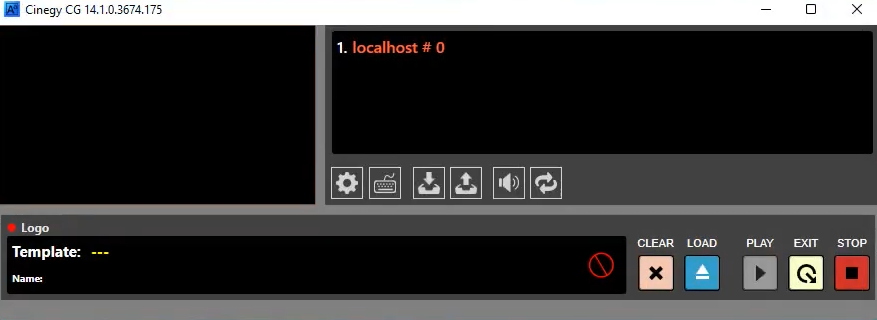
Getting started with Cinegy CG begins by creating a new graphics project. Users can establish the project’s structure, choose appropriate templates, and configure design settings according to production requirements.
A well-organized project helps streamline graphic creation and ensures consistency throughout a broadcast. During project setup, users typically define screen resolutions, graphic layers, branding elements, and animation preferences. This foundation makes future editing and management significantly easier, especially in fast-paced live production environments.
For broadcasters managing multiple channels or programs, project templates can save valuable time while maintaining visual consistency across different productions.
Step 2: Import Media / Setup
After creating a project, the next step involves importing media assets and configuring the working environment. Cinegy CG supports various media elements commonly used in broadcast graphics.
Typical imported assets include:
- Logos and channel branding
- Background graphics
- PNG images with transparency
- Video clips
- Fonts and typography packages
- Data feeds for dynamic content
The software allows users to organize assets efficiently, ensuring quick access during live productions. Proper media setup is especially important when working with news broadcasts, sports coverage, or live events where speed and reliability are essential.
A structured media library helps designers and operators manage complex graphic packages without confusion or delays.
Step 3: Main Workflow
The primary workflow in Cinegy CG revolves around designing, editing, and managing broadcast graphics in real time. Users can create visual elements using templates, text fields, images, animations, and data-driven components.
Graphics can be customized to match corporate branding or program-specific themes. Operators can update content instantly, making the platform ideal for live broadcasts where information changes rapidly.
Common workflow tasks include:
- Creating lower-thirds
- Designing title cards
- Updating breaking news banners
- Managing sports score graphics
- Displaying election results
- Controlling on-air branding elements
The intuitive workflow allows both designers and production operators to collaborate efficiently. This reduces production bottlenecks while improving overall broadcast quality.
Step 4: Add Features (Effects, Tools, and Customization)
One of the strongest aspects of Cinegy CG is its extensive customization capability. The software offers numerous tools and effects that enhance visual presentation while maintaining professional broadcast standards.
Advanced Graphics Features
Users can create visually engaging graphics using:
- Animated transitions
- Dynamic text updates
- Multi-layer compositions
- Real-time data integration
- Transparent overlays
- Custom templates
Data-Driven Graphics
A major advantage of Cinegy CG is its ability to connect with external data sources. This enables automatic updates for:
- News headlines
- Sports scores
- Financial information
- Weather updates
- Election statistics
Branding Flexibility
Broadcasters can fully customize graphics packages to match channel identity. Color schemes, typography, animations, and layouts can all be adjusted to maintain a consistent brand image across programming.
These features make Cinegy CG a valuable solution for organizations that require both creativity and operational efficiency.
Step 5: Export / Save Output
Once graphics are completed, users can save projects, export assets, or deploy graphics directly into live production environments.
Depending on workflow requirements, graphics may be:
- Saved for future use
- Integrated into playout systems
- Used during live broadcasts
- Archived for later editing
- Exported for production workflows
The software is designed to support professional broadcast environments where reliability and speed are critical. Efficient output management helps production teams deliver high-quality graphics without interruptions.
Best Use Cases for Cinegy CG
Cinegy CG is suitable for a wide range of professional media applications.
Television Broadcasting
News stations frequently use Cinegy CG for lower-thirds, breaking news graphics, scrolling tickers, and channel branding.
Sports Productions
Sports broadcasters benefit from real-time scoreboards, player statistics, match updates, and animated overlays.
Live Events
Corporate events, conferences, concerts, and award ceremonies can utilize Cinegy CG for professional presentation graphics.
Government and Educational Channels
Public information broadcasts often require data-driven graphics that can be updated instantly and accurately.
Streaming Productions
Modern online streaming operations can use Cinegy CG to improve visual quality and audience engagement with professional broadcast-style graphics.
Advantages and Limitations
Advantages
Cinegy CG offers numerous benefits for professional production teams:
- Professional broadcast-quality graphics
- Real-time graphic updates
- Extensive customization options
- Data-driven content integration
- Reliable live production performance
- Flexible template management
- Efficient workflow for operators and designers
- Suitable for both small and large broadcasters
These strengths make it an attractive solution for organizations seeking scalable graphics production tools.
Limitations
While Cinegy CG is highly capable, users should consider a few limitations:
- Learning curve for beginners
- Primarily designed for professional broadcast environments
- Advanced features may require operator training
- Some workflows depend on broader production infrastructure
- Smaller organizations may not need all enterprise-level capabilities
Understanding these factors helps organizations determine whether the platform aligns with their production requirements.
Alternatives to Cinegy CG
Several alternatives exist for users comparing broadcast graphics solutions.
Vizrt
A widely recognized graphics platform used by major broadcasters worldwide. It offers advanced visualization and real-time graphics capabilities.
Ross XPression
Known for high-performance motion graphics and live production integration in broadcast environments.
Chyron PRIME
A professional graphics solution commonly used for news, sports, and live television productions.
Singular.live
A cloud-based graphics platform designed for live streaming and digital broadcasting workflows.
CharacterWorks
A graphics solution suitable for creating professional television graphics with real-time control features.
Each alternative has unique strengths depending on production scale, budget, and technical requirements.
Frequently Asked Questions (FAQs)
Is Cinegy CG suitable for beginners?
Yes, beginners can learn the platform, although some professional broadcast concepts may require additional training and practice.
Can Cinegy CG be used for live broadcasts?
Yes. It is specifically designed for live production environments and real-time graphics management.
Does Cinegy CG support animated graphics?
Yes. Users can create animated transitions, motion graphics, and dynamic visual elements.
Can Cinegy CG integrate with external data sources?
Yes. The software supports data-driven graphics, enabling automatic updates from various information feeds.
What industries commonly use Cinegy CG?
Television broadcasters, sports networks, streaming providers, educational institutions, government channels, and event production companies commonly use Cinegy CG.
Is Cinegy CG suitable for professional broadcast operations?
Yes. It is built for professional-grade graphics production and supports demanding broadcast workflows.
Conclusion
Cinegy CG is a powerful and versatile broadcast graphics solution that helps media organizations create professional, real-time visual content. Its combination of customizable templates, data-driven graphics, live production capabilities, and broadcast-grade reliability makes it a strong choice for television stations, sports productions, live events, and streaming operations.
While there may be a learning curve for new users, the software’s advanced features and scalability provide long-term value for professional production teams. For organizations seeking a dependable character generation and graphics platform, Cinegy CG remains a capable solution that supports modern broadcasting demands while delivering visually engaging viewer experiences.
This version is SEO-optimized, beginner-friendly, and approximately 950+ words with natural keyword placement for “Cinegy CG” and related long-tail search terms.
Download
Telegram ID
eMail