MotionCaster 8K 2026: A Complete Guide to Professional Live Production and Broadcasting
The demand for high-quality live streaming and broadcast production continues to grow across industries, from television networks and sports organizations to educational institutions and corporate events. As audiences expect crystal-clear visuals and professional production quality, broadcasters need powerful tools that can handle modern workflows efficiently. This is where MotionCaster 8K stands out as a comprehensive live production and broadcasting solution.
MotionCaster 8K combines live switching, graphics creation, virtual studio capabilities, recording, and streaming into a single platform. Designed for both professional broadcasters and content creators, it helps users create engaging live productions without requiring multiple software applications. Whether you’re producing sports events, news broadcasts, online conferences, or entertainment programs, MotionCaster 8K provides the tools needed to deliver high-quality results.
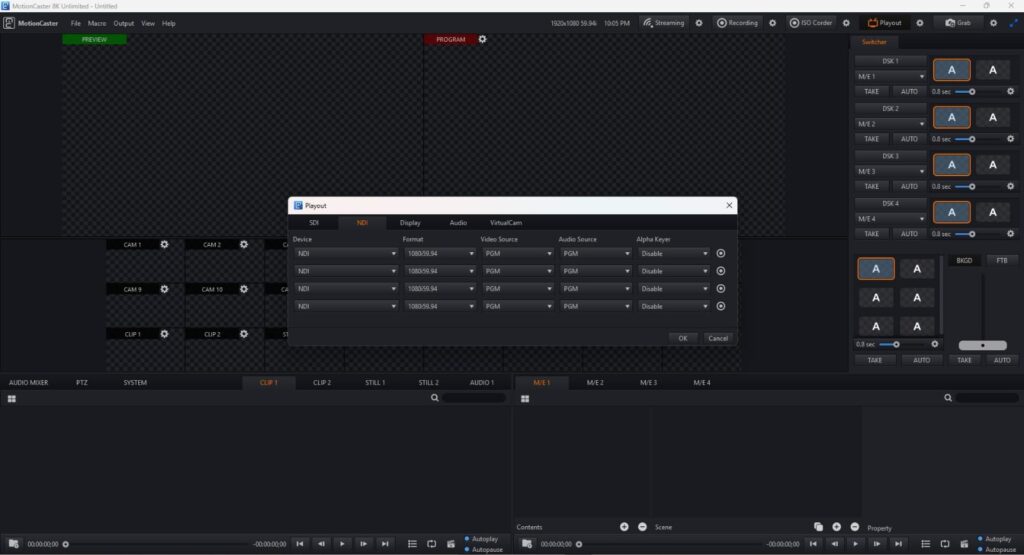
Step 1: Create a New Project
Getting started with MotionCaster 8K begins with creating a new project. The software offers a structured setup process that allows users to configure their production environment before going live.
When launching a new project, users can define important settings such as video resolution, frame rate, production format, and output destinations. Selecting the correct project settings ensures smooth performance throughout the production process and helps maintain consistent broadcast quality.
For beginners, MotionCaster 8K provides user-friendly project templates that simplify setup. Experienced broadcasters can customize advanced parameters to match specific production requirements. Taking a few minutes to configure the project properly can significantly improve workflow efficiency later in the production process.
Step 2: Import Media / Setup
After creating a project, the next step is importing media assets and configuring production sources. MotionCaster 8K supports various media formats, making it easy to integrate videos, images, audio files, and graphics into a live production environment.
Users can connect multiple camera feeds, capture devices, and external video sources directly within the software. This flexibility allows broadcasters to build complex multi-camera productions without needing separate management tools.
Typical setup tasks include:
- Importing logos and branding elements
- Adding intro and outro videos
- Connecting camera sources
- Configuring audio inputs
- Loading lower-thirds and graphic templates
- Setting up streaming destinations
Proper media organization during this stage helps streamline production and reduces the likelihood of mistakes during live broadcasts.
Step 3: Main Workflow
The core strength of MotionCaster 8K lies in its powerful live production workflow. Once sources and assets are configured, users can begin managing their broadcast through an intuitive production interface.
The software allows real-time switching between camera angles, video clips, graphics, and virtual sets. Producers can control transitions, monitor program outputs, and adjust production elements while the broadcast is running.
One of the standout features is the ability to combine multiple production tasks within a single environment. Instead of switching between separate applications for graphics, streaming, and switching, MotionCaster 8K centralizes everything into one workflow.
This integrated approach improves production speed and helps teams focus more on content creation rather than technical management. It is especially useful for live events where timing and accuracy are critical.
Step 4: Add Features (Effects, Tools, and Customization)
To create visually engaging broadcasts, MotionCaster 8K includes a variety of professional production tools and customization options. These features help transform basic video streams into polished, broadcast-ready presentations.
Users can apply transitions, overlays, animations, and dynamic graphics to enhance viewer engagement. Virtual studio technology allows broadcasters to create immersive production environments without expensive physical sets.
Key features often used in production workflows include:
- Virtual studio integration
- Real-time graphics rendering
- Lower-third title creation
- Scoreboards and sports graphics
- Chroma key functionality
- Multi-layer video composition
- Custom branding tools
- Live social media integration
These advanced capabilities make MotionCaster 8K suitable for everything from online webinars to professional television productions. The customization options also allow organizations to maintain consistent branding across all broadcasts.
Step 5: Export / Save Output
Once the production is complete, MotionCaster 8K provides multiple options for saving and distributing content. Users can record broadcasts locally while simultaneously streaming to online platforms.
The export process is designed to preserve video quality while offering flexibility for different delivery requirements. Productions can be archived for future use, edited further in post-production software, or uploaded directly to content distribution platforms.
Common output options include:
- High-resolution video recording
- Live streaming to multiple destinations
- Broadcast-ready output formats
- Cloud-based distribution workflows
- Archive and backup recording
This versatility ensures content creators can maximize the value of every production by repurposing recorded material across various channels.
Best Use Cases for MotionCaster 8K
MotionCaster 8K is designed to support a wide range of production environments. Its comprehensive feature set makes it suitable for both small-scale content creators and large broadcasting organizations.
Popular use cases include:
- Live television production
- Sports broadcasting
- News and current affairs programs
- Corporate events and conferences
- Educational live streaming
- Religious services
- Esports tournaments
- Entertainment and talk shows
- Hybrid virtual events
Organizations seeking a complete live production solution often choose MotionCaster 8K because it combines multiple broadcasting functions within a single platform.
Advantages and Limitations
Advantages
MotionCaster 8K offers several benefits that make it an attractive solution for modern broadcasters.
- Comprehensive all-in-one production platform
- Supports high-resolution broadcasting workflows
- Professional virtual studio capabilities
- Flexible multi-camera production support
- Real-time graphics and overlays
- Streamlined user interface
- Suitable for both beginners and professionals
- Efficient live streaming integration
- Strong customization options
Limitations
Despite its strengths, there are some considerations users should keep in mind.
- Advanced features may require a learning curve
- High-resolution workflows can demand powerful hardware
- Large productions may require additional setup planning
- Some specialized broadcast environments may need extra integrations
- Professional deployments may involve significant system resources
Understanding these limitations helps users determine whether MotionCaster 8K aligns with their specific production requirements.
Alternatives to MotionCaster 8K
While MotionCaster 8K is a powerful broadcasting solution, several alternatives are available depending on workflow needs and budget considerations.
Some popular alternatives include:
- vMix
- OBS Studio
- Wirecast
- TriCaster
- XSplit Broadcaster
- Livestream Studio
- Streamlabs Desktop
Each platform offers different strengths, ranging from budget-friendly live streaming tools to enterprise-level broadcast production systems. Evaluating production goals and technical requirements can help users select the most suitable option.
Frequently Asked Questions (FAQs)
Is MotionCaster 8K suitable for beginners?
Yes. While it includes advanced broadcasting features, MotionCaster 8K Download provides an organized interface that helps beginners learn professional production workflows more easily.
Can MotionCaster 8K handle live streaming?
Yes. The platform supports live streaming and broadcasting workflows, allowing users to distribute content to multiple destinations.
Does MotionCaster 8K support virtual studios?
Yes. Virtual studio functionality is one of the software’s major strengths, enabling professional-looking productions without physical studio environments.
Can I use multiple cameras with MotionCaster 8K?
Yes. Multi-camera production is supported, making it suitable for events, interviews, sports coverage, and professional broadcasts.
Is MotionCaster 8K good for corporate events?
Absolutely. Many organizations use MotionCaster 8K for conferences, webinars, training sessions, and corporate communications.
Conclusion
MotionCaster 8K is a powerful live production and broadcasting solution that combines switching, graphics, streaming, recording, and virtual studio technology into a single platform. Its comprehensive feature set makes it an excellent choice for broadcasters, content creators, educational institutions, and businesses looking to produce professional-quality live content.
From project setup and media management to real-time production and final output delivery, MotionCaster 8K simplifies complex broadcasting workflows while maintaining high production standards. Although advanced productions may require strong hardware and some learning time, the software’s flexibility and extensive capabilities make it a valuable investment for modern live production environments.
For organizations seeking a reliable and scalable live broadcasting solution, MotionCaster 8K remains a strong option capable of supporting a wide variety of professional production needs.
Download
Telegram ID
eMail