MV Video Transcoder 2026: A Complete Guide to Fast and Efficient Video Conversion Introduction
Video files come in many formats, and not every device or platform supports them all. Whether you are a content creator, video editor, marketer, or casual user, having a reliable video conversion tool is essential. MV Video Transcoder is designed to help users convert videos between multiple formats while maintaining quality and ensuring compatibility across different devices and platforms.
With its straightforward workflow and powerful processing capabilities, MV Video Transcoder simplifies the process of handling video files. This guide explores its features, workflow, use cases, advantages, limitations, and alternatives, helping you determine whether it is the right solution for your video conversion needs.
Step 1: Create a New Project
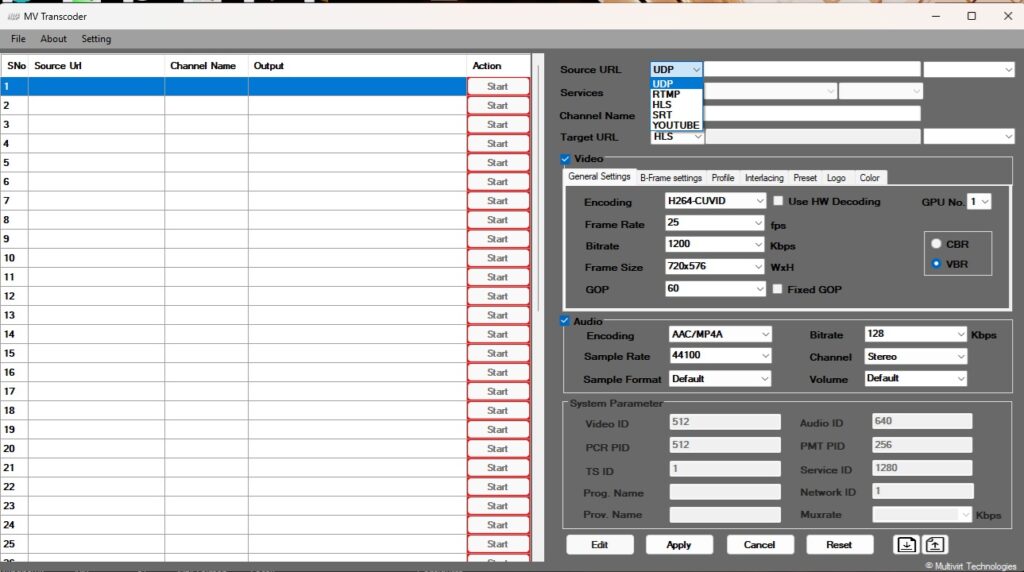
Getting started with MV Video Transcoder is simple and beginner-friendly. After launching the software, users can create a new project to organize their video conversion tasks. The project setup screen typically allows users to define output preferences, select target formats, and configure basic settings before processing begins.
Creating a dedicated project helps keep multiple video conversion tasks organized, especially when working with large batches of media files. It also makes it easier to revisit settings later and maintain consistency across multiple video exports. This structured approach improves workflow efficiency and reduces the risk of configuration errors during the conversion process.
Step 2: Import Media / Setup
Once a project has been created, the next step is importing media files. MV Video Transcoder supports importing video files from local storage, external drives, and other supported sources. Users can add individual files or entire folders, making it suitable for both small and large-scale conversion projects.
After importing media, users can configure important settings such as output resolution, frame rate, bitrate, codec preferences, and audio quality. These settings allow users to optimize videos for different platforms, including social media, websites, mobile devices, and professional editing environments. Proper setup ensures the final output meets quality and compatibility requirements.
Step 3: Main Workflow
The core workflow of MV Video Transcoder revolves around video conversion and format optimization. After media files are imported and settings are configured, users can review conversion parameters before starting the processing task. The software handles encoding and transcoding efficiently while preserving as much original quality as possible.
Users can process a single file or convert multiple videos simultaneously through batch processing features. This capability is particularly useful for content creators, video production teams, and businesses that manage large media libraries. The streamlined workflow reduces manual effort and allows users to complete conversion tasks more quickly and consistently.
Step 4: Add Features
MV Video Transcoder includes various tools and customization options that enhance the overall conversion process. These features allow users to tailor output files according to specific requirements without relying on additional software.
Common customization options may include:
- Video resizing and scaling
- Frame rate adjustments
- Audio bitrate modification
- Codec selection
- Quality optimization settings
- Batch conversion management
- Device-specific output presets
These tools help users create videos optimized for different devices and platforms. Whether preparing content for streaming services, presentations, online courses, or social media channels, the software offers flexibility to meet various production goals while maintaining efficiency.
Step 5: Export / Save Output
After all settings have been finalized, users can begin the export process. MV Video Transcoder processes the selected files and generates output videos according to the chosen specifications. Export settings can be customized to balance quality, file size, and processing speed.
Once the conversion is complete, the output files can be saved to a preferred destination folder for easy access. The software’s export system is designed to deliver reliable results while minimizing compatibility issues. Users can then upload, share, archive, or further edit the converted files as needed.
Best Use Cases for MV Video Transcoder
MV Video Transcoder can be used across various industries and workflows. Its flexibility makes it suitable for both personal and professional applications.
Some of the best use cases include:
- Converting videos for social media platforms
- Preparing content for mobile devices
- Optimizing videos for websites and online streaming
- Batch processing large media libraries
- Creating platform-compatible video formats
- Archiving old video collections
- Preparing footage for video editing software
- Managing multimedia content for businesses and educational institutions
Its broad compatibility and efficient processing make it a valuable tool for anyone who regularly works with digital video content.
Advantages and Limitations
Like any software solution, MV Video Transcoder offers several benefits while also having certain limitations that users should consider before adopting it into their workflow.
Advantages
One of the biggest advantages of MV Video Transcoder is its ease of use. Beginners can quickly learn the workflow, while advanced users can take advantage of detailed configuration options. The software supports multiple formats and provides flexible output settings for different devices and platforms.
Additional benefits include:
- User-friendly interface
- Batch conversion support
- Multiple output format options
- Flexible quality settings
- Efficient processing workflow
- Improved device compatibility
- Time-saving automation features
These strengths make the software suitable for a wide range of video conversion tasks.
Limitations
Despite its advantages, MV Video Transcoder may not replace a full-featured professional video editing suite. Users looking for advanced editing capabilities such as complex visual effects, motion graphics, or timeline-based editing may need additional software.
Potential limitations include:
- Limited advanced editing tools
- Learning curve for advanced settings
- Processing speed depends on hardware performance
- Some specialized codecs may require additional configuration
Understanding these limitations helps users set realistic expectations and choose the right tool for their specific needs.
Alternatives to MV Video Transcoder
While MV Video Transcoder provides reliable video conversion capabilities, several alternatives are available depending on workflow requirements and budget considerations.
Popular alternatives include:
- HandBrake
- FFmpeg
- Adobe Media Encoder
- Wondershare UniConverter
- Freemake Video Converter
- Any Video Converter
- Movavi Video Converter
Each alternative offers different strengths, ranging from open-source flexibility to enterprise-level media processing capabilities. Evaluating features, performance, and ease of use can help users select the best solution for their projects.
Frequently Asked Questions (FAQs)
What is MV Video Transcoder used for?
MV Video Transcoder is primarily used for converting video files between different formats while maintaining quality and improving compatibility across devices and platforms.
Is MV Video Transcoder suitable for beginners?
Yes. The software is designed with an intuitive interface that makes it accessible to beginners while still offering advanced settings for experienced users.
Can MV Video Transcoder process multiple videos at once?
Yes. Batch conversion functionality allows users to convert multiple files simultaneously, saving time and improving productivity.
Does MV Video Transcoder support different output resolutions?
Yes. Users can typically choose from various resolutions and customize output settings according to their project requirements.
Can converted videos be used for social media platforms?
Absolutely. The software can optimize videos for popular social media platforms and online streaming services through customizable export settings.
Does MV Video Transcoder reduce video quality?
When configured correctly, MV Video Transcoder aims to preserve video quality while converting files. However, quality can vary depending on selected compression and export settings.
Conclusion
MV Video Transcoder is a practical and efficient solution for users who need reliable video conversion capabilities. Its simple workflow, batch processing support, customizable settings, and broad format compatibility make it useful for content creators, businesses, educators, and everyday users alike.
Whether you need to prepare videos for streaming, optimize media for mobile devices, or manage large collections of digital content, MV Video Transcoder provides the tools necessary to streamline the process. While it may not replace advanced video editing software, it excels at its primary purpose—fast, flexible, and dependable video transcoding. For users seeking an accessible yet capable video conversion solution, MV Video Transcoder is certainly worth considering.
Download
Telegram ID
eMail