Easy SRT: A Complete Guide to Creating, Editing, and Managing Subtitle Files
In today’s digital content landscape, subtitles have become essential for improving accessibility, audience engagement, and content reach. Whether you create videos for YouTube, online courses, social media, or business presentations, accurate subtitles can significantly enhance the viewing experience. Easy SRT is a practical subtitle editing solution designed to help users create, edit, and manage SRT subtitle files efficiently. With its straightforward interface and useful editing tools, Easy SRT simplifies the subtitle creation process for both beginners and experienced content creators. This guide explores how Easy SRT works, its key features, benefits, limitations, and the best ways to use it.
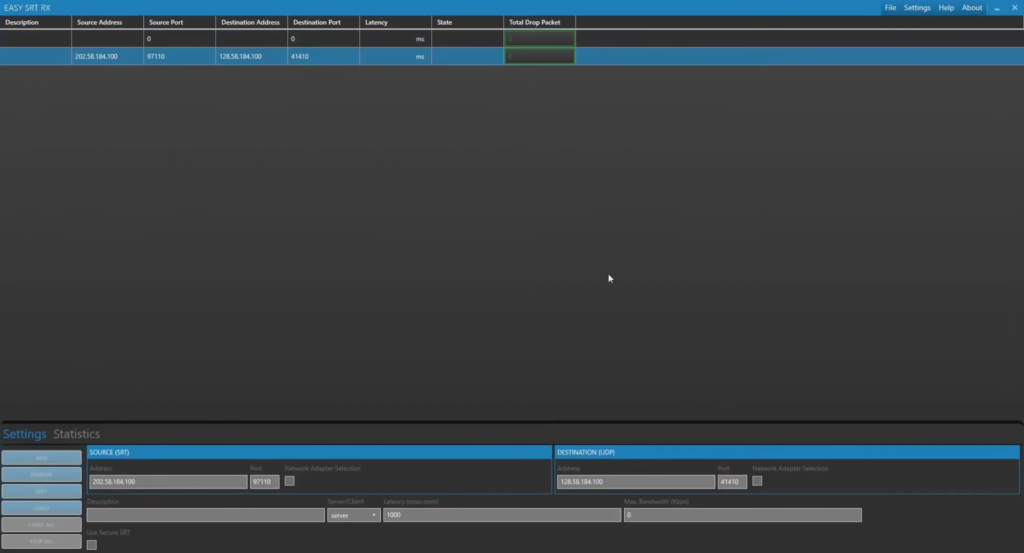
Step 1: Create a New Project
Getting started with Easy SRT software is a simple process that requires minimal setup. After launching the software, users can create a new subtitle project by selecting the appropriate option from the main interface. A new project acts as the workspace where all subtitle timing, text entries, and editing activities are managed. Organizing subtitles within a dedicated project helps maintain consistency throughout the editing process. Before adding any captions, users can define project settings, ensuring that subtitle formatting and timing preferences align with the video’s requirements.
Step 2: Import Media / Setup
Once the project has been created, the next step is importing the video or audio file that requires subtitles. Easy SRT supports loading media files so users can synchronize captions accurately with spoken content. After importing media, the playback controls become available, allowing users to navigate through the timeline efficiently. Proper setup at this stage is important because it establishes the foundation for accurate subtitle timing. Users can preview content, identify dialogue sections, and prepare the timeline before beginning the subtitle creation process.
Step 3: Main Workflow (Subtitle Editing and Timing)
The core functionality of Easy SRT revolves around subtitle creation, editing, and synchronization. Users can add subtitle entries manually while listening to audio or watching video playback. Each subtitle segment contains timing information and text content, making it easy to control when captions appear and disappear. The software allows editors to adjust timestamps, correct spelling mistakes, and refine subtitle positioning throughout the project. This workflow is especially useful for creating professional subtitles that match speech naturally and improve audience comprehension.
Accurate synchronization is one of the most important aspects of subtitle production. Easy SRT enables users to fine-tune subtitle timing with precision, ensuring captions remain aligned with spoken dialogue. This level of control helps eliminate delays and mismatched subtitles that could distract viewers. Whether editing short clips or longer productions, users can efficiently manage subtitle sequences and maintain a smooth viewing experience from beginning to end.
Step 4: Add Features (Effects, Tools, and Customization)
Easy SRT includes several useful tools that enhance subtitle editing productivity. Users can quickly modify subtitle text, merge entries, split captions, and adjust timing without restarting the project. These tools help streamline the editing process and reduce the time required to create professional-quality subtitle files. The software’s editing environment is designed to make subtitle management straightforward, even for users with limited technical experience.
Customization options allow editors to improve subtitle readability and organization. Depending on the workflow, users may be able to adjust formatting preferences, subtitle duration, and text structure for better presentation. Consistent formatting improves accessibility and ensures subtitles remain clear across different playback platforms. These customization features make Easy SRT suitable for a variety of video production environments, including educational content, marketing videos, tutorials, and entertainment projects.
Step 5: Export / Save Output
After completing subtitle editing and synchronization, the final step is exporting the finished subtitle file. Easy SRT allows users to save their work in the widely supported SRT format, making it compatible with numerous video platforms and media players. Before exporting, editors can review the entire subtitle timeline to ensure timing accuracy and text consistency. A final quality check helps prevent errors that could affect the viewer experience.
Exporting subtitles in SRT format offers flexibility for content creators because the files can be uploaded separately to video hosting platforms or integrated into post-production workflows. This compatibility makes Easy SRT a practical solution for users who need reliable subtitle output for professional and personal projects alike.
Best Use Cases for Easy SRT
Easy SRT can be valuable across many content creation scenarios. Its subtitle-focused workflow makes it suitable for users who need accurate caption management without complex video editing tools.
Common use cases include:
- YouTube video subtitle creation
- Online course captioning
- Corporate training videos
- Social media video accessibility
- Educational content production
- Podcast transcript synchronization
- Interview and documentary subtitling
- Language learning materials
- Marketing and promotional videos
Its simplicity makes it particularly appealing for creators who want to focus on subtitle accuracy rather than advanced video production features.
Advantages and Limitations
Every subtitle editing tool has strengths and weaknesses. Understanding both helps users determine whether Easy SRT is the right solution for their workflow and content requirements.
Advantages
Easy SRT offers a user-friendly environment that simplifies subtitle editing and management. The software focuses specifically on subtitle creation, reducing unnecessary complexity and making it easier for beginners to learn. Its efficient timeline controls, subtitle synchronization capabilities, and SRT export support help users create professional subtitles without extensive technical knowledge. The lightweight workflow also makes it suitable for quick editing tasks and regular subtitle production projects.
Limitations
While Easy SRT performs well for subtitle-focused tasks, it may not provide the advanced automation, speech recognition, or AI-powered caption generation features available in some modern subtitle platforms. Users handling large-scale subtitle projects may require additional tools for translation, collaboration, or automated transcription. Depending on workflow requirements, some professionals may prefer software with broader multimedia editing capabilities alongside subtitle management.
Alternatives to Easy SRT
Several subtitle editing solutions can serve as alternatives to Easy SRT depending on user needs and project complexity.
- Subtitle Edit
- Aegisub
- Jubler
- VisualSubSync
- Subtitle Workshop
- EZTitles
- Happy Scribe
- SubtitleNEXT
Each alternative offers different features ranging from basic subtitle editing to advanced professional localization and transcription workflows.
Frequently Asked Questions (FAQs)
Is Easy SRT suitable for beginners?
Yes. Easy SRT is designed with simplicity in mind, making it accessible for users who are new to subtitle editing and caption creation.
What file format does Easy SRT primarily use?
Easy SRT focuses on creating and editing SRT subtitle files, one of the most widely supported subtitle formats in the industry.
Can Easy SRT be used for YouTube subtitles?
Yes. SRT files created with Easy SRT can typically be uploaded to video platforms that support external subtitle files.
Is Easy SRT useful for educational content?
Absolutely. Teachers, trainers, and online course creators can use Easy SRT to improve accessibility and engagement through accurate captions.
Does Easy SRT support subtitle synchronization?
Yes. One of its primary functions is helping users align subtitle timing accurately with spoken dialogue and video content.
Conclusion
Easy SRT is a practical subtitle editing solution for creators who need an efficient way to produce accurate and professional SRT subtitle files. Its straightforward workflow, subtitle synchronization tools, and export capabilities make it suitable for beginners as well as experienced editors. Whether you’re creating captions for YouTube videos, online courses, corporate training content, or social media productions, Easy SRT provides the essential features needed to manage subtitles effectively. For users seeking a focused and accessible subtitle editing tool, Easy SRT remains a valuable option that helps improve content accessibility and viewer engagement.
Download
Telegram ID
eMail