Logosys Multi Channel Playout: Complete Guide to Professional Broadcast Automation
Broadcasting today requires more than simply playing video files. Television channels, OTT platforms, corporate broadcasters, and media operations need reliable systems that can organize content, manage multiple channels, schedule programs, and keep broadcasts running smoothly. Logosys Multi Channel Playout is designed around this type of professional broadcasting workflow, helping operators manage scheduled media and channel output from a centralized environment.
For broadcasters looking for a practical multi-channel playout system, the goal is to simplify daily operations while maintaining consistent programming. Whether you are managing several television channels or building a professional broadcast workflow, understanding how a system like Logosys Multi Channel Playout works can help you plan an efficient playout operation.
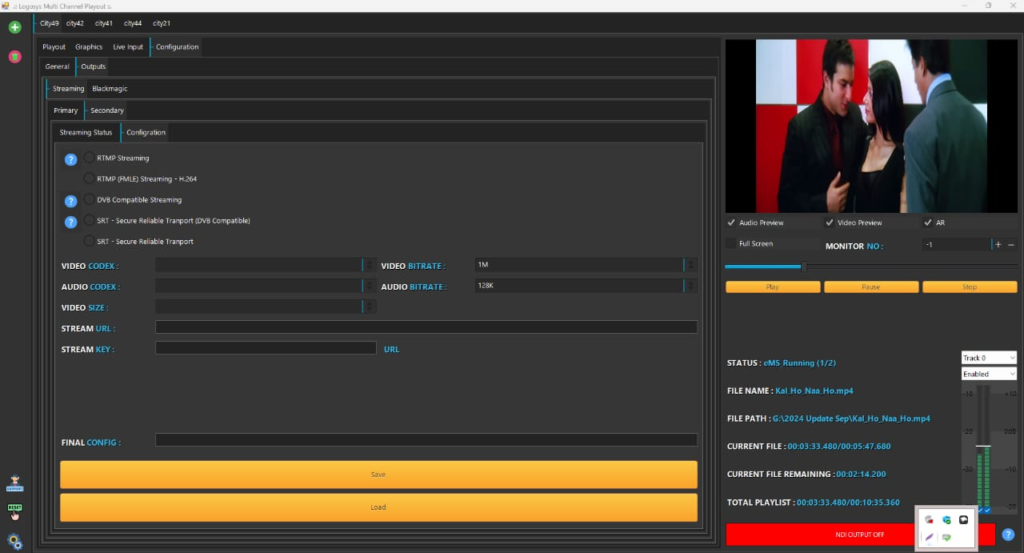
Step 1: Create a New Project
The first step in a typical Logosys Multi Channel Playout workflow is setting up a new project or channel environment. Before adding content, operators can define the basic structure of the broadcast operation, including channels, media categories, schedules, and other required settings.
A well-organized project makes daily broadcasting easier because content can be arranged according to the channel’s programming requirements. Operators should establish naming conventions and organize media carefully from the beginning.
When creating a new playout project, consider:
- Channel identification and output requirements
- Program categories and media organization
- Daily or weekly scheduling needs
- Commercial and promotional content
- Branding and graphics requirements
- Operator access and workflow responsibilities
Proper setup can reduce mistakes later and make the entire Logosys Multi Channel Playout workflow easier to manage.
Step 2: Import Media / Setup
After creating the project, the next stage involves preparing and organizing the media library. Broadcast content may include movies, television programs, news packages, commercials, promotional clips, station IDs, trailers, and other video assets.
Media should be checked before it is placed into a live schedule. File compatibility, duration, audio, video quality, and naming are important considerations in a professional playout environment. Keeping content organized also makes it easier for operators to locate the correct files quickly.
For a reliable multi-channel broadcast playout setup, it is useful to separate content into logical categories. For example, programs, advertisements, promos, and station branding can be managed independently so that operators can build schedules without unnecessary confusion.
Step 3: Main Workflow
The main workflow of Logosys Multi Channel Playout revolves around preparing programming and controlling the broadcast sequence. Once media is available, operators can arrange content according to the desired transmission schedule.
A typical schedule may contain several types of content, including primary programs, commercial breaks, promotional material, and channel branding. The operator’s objective is to make sure each item appears at the correct time and in the correct sequence.
For broadcasters handling multiple channels, organization becomes especially important. Each channel may have different programming, schedules, and commercial requirements. A centralized multi-channel playout solution can help operators maintain separate workflows while keeping overall operations structured.
Before going live, operators should review the schedule carefully. Checking media duration, content order, gaps, and scheduled events can help prevent common transmission problems.
Step 4: Add Features (Effects/Tools/Customization)
Professional playout operations often require more than basic media playback. Branding, promotional content, graphics, and other broadcast elements can help a channel maintain a consistent visual identity.
Depending on the configuration and supporting workflow, Logosys Multi Channel Playout can be used as part of a broader broadcast environment where operators manage channel presentation and scheduled content. Customization may include organizing channel branding, promotional elements, and different types of programming within the overall transmission workflow.
Useful areas to consider include:
- Channel branding and presentation
- Program and commercial scheduling
- Promotional content management
- Multiple channel organization
- Broadcast continuity
- Media library management
- Operator-friendly workflow configuration
These tools can be particularly useful for stations that need to manage recurring programming without manually rebuilding every broadcast sequence.
Step 5: Export / Save Output
The final stage is preparing the configured workflow for transmission and saving the necessary project or scheduling information. In a professional broadcast environment, the objective is not simply to create a playlist but to ensure that the scheduled content is ready for reliable channel output.
Operators should review the final schedule and confirm that all required media is available. It is also important to verify that the correct channel and output configuration are being used before starting transmission.
Maintaining backups of important schedules and project configurations can also be valuable. A structured backup process helps broadcasters recover quickly if a system or media-management issue occurs.
Best Use Cases for Logosys Multi Channel Playout
Logosys Multi Channel Playout can be considered for broadcast environments where multiple channels or complex programming schedules need centralized management. Its general use cases include:
- Television stations managing multiple channels
- Cable and local broadcast operations
- Professional media organizations
- Corporate broadcasting environments
- Scheduled entertainment channels
- Promotional and branded video channels
- Broadcast facilities requiring organized media playback
It can be especially useful when a broadcaster wants to reduce repetitive manual operations and establish a more structured playout workflow.
Advantages and Limitations
Advantages
A professional multi-channel playout approach can provide several operational benefits. Logosys Multi Channel Playout can fit workflows where centralized content management and scheduled broadcasting are important.
Key advantages include:
- Multi-channel workflow: Designed around managing more than one broadcast channel.
- Organized scheduling: Helps operators structure programming in advance.
- Media management: Makes it easier to work with different types of broadcast content.
- Operational efficiency: Reduces the need for repetitive manual playback tasks.
- Professional workflow: Suitable for structured broadcast environments.
- Scalability potential: Can be incorporated into workflows that grow as programming requirements increase.
Limitations
Like any broadcast software, the overall experience depends on the specific installation, hardware, supported formats, integrations, and operational requirements. New users may also need time to understand professional playout concepts.
Potential limitations include:
- Initial configuration may require technical knowledge.
- Broadcast hardware and infrastructure may be needed.
- Operators need proper training for reliable daily use.
- Compatibility should be checked against existing workflows.
- Advanced broadcasting requirements may require additional systems or integrations.
Alternatives to Logosys Multi Channel Playout
Broadcasters have several categories of alternatives when selecting professional playout software. Options can include traditional broadcast automation platforms, channel-in-a-box systems, software-based playout solutions, and integrated media automation platforms.
When comparing alternatives, look beyond the basic playback function. Important factors include channel capacity, scheduling tools, supported media formats, graphics integration, automation capabilities, hardware requirements, technical support, and overall operating cost.
The best Logosys Multi Channel Playout alternative will depend on the size of the broadcaster, the number of channels, required automation level, existing infrastructure, and future expansion plans.
Frequently Asked Questions (FAQs)
What is Logosys Multi Channel Playout?
Logosys Multi Channel Playout is a broadcast-oriented solution designed around managing scheduled media and multi-channel playout operations. It can be used as part of a professional workflow for organizing and transmitting television programming.
Who can use a multi-channel playout system?
Television broadcasters, cable operators, media organizations, corporate broadcasters, and other content providers can benefit from multi-channel playout systems when they need organized scheduling and automated media transmission.
Is technical knowledge required?
Some technical knowledge is helpful, particularly for configuring channels, media, schedules, outputs, and broadcast infrastructure. However, operators can become comfortable with the workflow through proper training and regular use.
What content can be managed?
A playout workflow can typically involve programs, commercials, promotional clips, station IDs, trailers, and other scheduled broadcast assets. Supported formats and capabilities should be confirmed for the specific installation.
Can it be used for multiple TV channels?
The system is intended for multi-channel playout workflows, making it relevant to broadcasters that need to organize programming across multiple channels. The actual channel capacity depends on the specific configuration and infrastructure.
What should I consider before choosing playout software?
Consider channel requirements, automation features, scheduling, media compatibility, hardware, graphics support, reliability, scalability, technical support, and total operating costs before making a decision.
Conclusion
Logosys Multi Channel Playout represents the type of broadcast workflow designed to make scheduled television transmission more organized and manageable. By combining media organization, scheduling, channel management, and automated playout concepts, it can help broadcasters build a more consistent daily broadcasting operation.
For beginners, the most important step is to understand the complete workflow: create a project, organize media, prepare schedules, configure required features, and verify the final output. For professional broadcasters, careful planning, compatible infrastructure, and reliable operational procedures remain essential.
If your goal is to manage multiple broadcast channels efficiently, a structured Logosys Multi Channel Playout workflow can provide a practical foundation for modern television and media operations. Always evaluate the system against your specific channel requirements and technical environment before deployment.
Download
Telegram ID
eMail
Request for One Day Pro Demo For Free Pro Demo Download