Playdeck 3.8.0: A Complete Guide to Creating, Managing, and Delivering Professional Media Projects
Playdeck is a powerful media management and content delivery solution designed to simplify workflows for broadcasters, production teams, digital content creators, and media organizations. Whether you are managing video assets, organizing playback schedules, or delivering content across multiple platforms, Playdeck provides a streamlined environment that improves efficiency and reduces operational complexity. Its user-friendly interface makes it accessible to beginners, while its advanced capabilities offer the flexibility required by professional users working in demanding production environments.
With modern media workflows becoming increasingly complex, organizations need tools that can handle content preparation, scheduling, playback, and distribution from a centralized platform. Playdeck addresses these challenges by offering a reliable solution that supports smooth content management and delivery. In this guide, we will explore how Playdeck works, its key features, advantages, limitations, and the best use cases for this versatile platform.
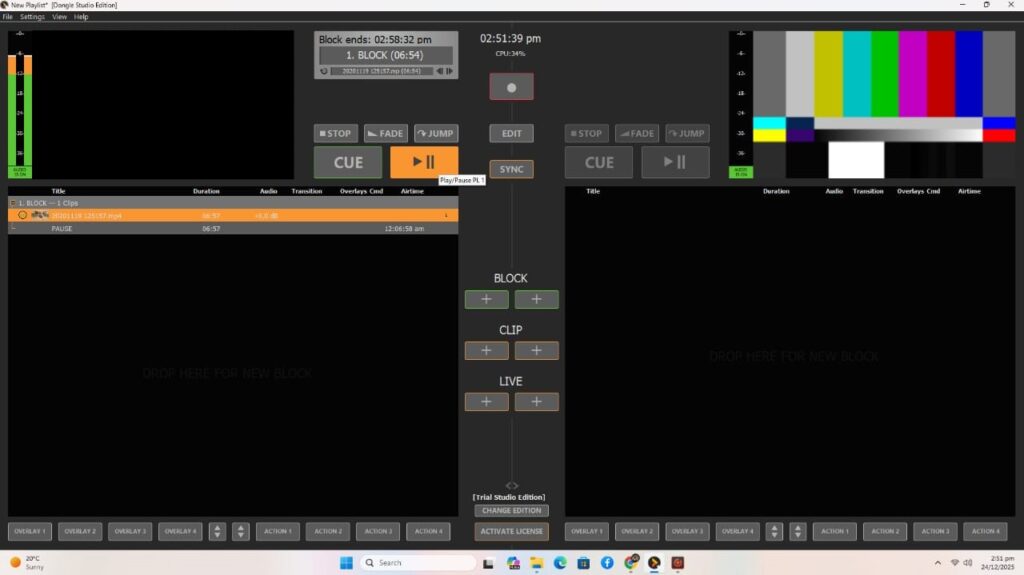
Step 1: Create a New Project
Getting started with Playdeck begins with creating a new project. The platform provides a straightforward setup process that allows users to define project parameters, organize media assets, and prepare content for future workflows. New projects can be customized according to production requirements, helping teams maintain consistency across different media operations.
Users can establish naming conventions, folder structures, and workflow settings during project creation. This initial organization stage is essential because it creates a structured environment for content management. By setting up projects properly from the start, teams can improve collaboration, reduce confusion, and maintain better control over media resources throughout the production process.
Step 2: Import Media / Setup
After creating a project, the next step is importing media files and configuring the workspace. Playdeck supports a wide range of media formats, allowing users to work with video, audio, graphics, and other digital assets without extensive file conversion. This flexibility helps streamline production workflows and saves valuable time.
The setup phase also includes organizing content into categories, assigning metadata, and configuring playback or delivery settings. Proper media preparation improves asset discoverability and ensures that files can be quickly located when needed. Efficient setup procedures contribute to smoother operations, especially in environments that manage large volumes of content on a daily basis.
Step 3: Main Workflow
The primary workflow in Playdeck revolves around content management, scheduling, playback preparation, and media delivery. Users can organize assets, arrange playlists, monitor project progress, and coordinate distribution activities from a centralized dashboard. This unified approach helps reduce operational complexity and improves overall productivity.
Playdeck enables teams to manage content efficiently while maintaining high levels of accuracy and consistency. Whether preparing broadcasts, managing digital signage, or coordinating multimedia presentations, the platform provides the tools necessary to keep workflows organized. Its intuitive design allows users to focus on content delivery rather than navigating complicated technical processes.
Step 4: Add Features (Effects, Tools, and Customization)
One of the strengths of Playdeck is its ability to support customization and workflow enhancements. Users can configure settings, apply automation tools, manage playlists, and integrate additional features that improve operational efficiency. These capabilities allow organizations to adapt the platform to their specific production requirements.
Customization options help create workflows that align with business objectives and operational standards. Features such as scheduling controls, asset tagging, monitoring tools, and automated content management can significantly improve productivity. By tailoring the system to unique needs, users can optimize performance while maintaining a streamlined and organized production environment.
Step 5: Export / Save Output
Once media content has been prepared and organized, Playdeck allows users to save, export, or distribute their output according to project requirements. The platform supports multiple output configurations, making it suitable for various content delivery scenarios. This flexibility helps ensure compatibility with different broadcasting and digital media systems.
Export settings can be adjusted to match technical specifications and workflow demands. Whether distributing content to broadcasting channels, internal networks, or digital platforms, Playdeck simplifies the final delivery process. Reliable output management helps maintain content quality and ensures that projects reach their intended audiences effectively.
Best Use Cases for Playdeck
Playdeck is suitable for a wide range of media-related applications. Its flexibility and workflow management capabilities make it valuable across multiple industries and production environments.
Common use cases include:
- Broadcast content management
- Television playout operations
- Digital signage management
- Corporate media presentations
- Event production workflows
- Educational media distribution
- Multimedia content scheduling
- Centralized asset management
Organizations that require reliable media organization and delivery can benefit significantly from implementing Playdeck within their operational workflows.
Advantages and Limitations
Like any professional media platform, Playdeck offers several strengths while also presenting some limitations depending on specific user requirements and technical environments.
Advantages
Playdeck delivers a user-friendly experience while maintaining professional-grade functionality. Its centralized workflow management capabilities help reduce complexity and improve operational efficiency. The platform supports various media formats, making it adaptable to diverse production requirements. Flexible customization options allow organizations to configure workflows that match their unique objectives and operational standards.
Additional advantages include scalability, improved asset organization, streamlined content delivery, and enhanced collaboration among team members. These benefits make Playdeck an attractive solution for both small production teams and large media organizations seeking efficient content management systems.
Limitations
Although Playdeck offers many useful features, some users may experience a learning curve when configuring advanced workflow settings and integrations. Organizations with highly specialized requirements may need additional customization or third-party solutions to achieve certain objectives.
The effectiveness of the platform may also depend on existing infrastructure, hardware resources, and workflow complexity. New users may require training to fully utilize advanced functionality and maximize operational efficiency. Careful planning and implementation can help overcome these challenges and ensure successful adoption.
Alternatives to Playdeck
Several alternatives may be considered Playdeck V3.8.0 download depending on organizational requirements and workflow preferences. Popular options include media asset management systems, broadcast automation platforms, content scheduling solutions, and digital signage software.
When evaluating alternatives, users should consider factors such as scalability, ease of use, integration capabilities, automation features, and long-term operational costs. The ideal solution will depend on the size of the organization, content volume, and specific production objectives. Comparing available options helps ensure the selected platform aligns with current and future workflow needs.
Frequently Asked Questions (FAQs)
What is Playdeck used for?
Playdeck is primarily used for media management, content organization, scheduling, playback preparation, and content delivery across various production environments.
Is Playdeck suitable for beginners?
Yes. The platform provides an intuitive interface that allows beginners to learn basic functions while offering advanced tools for professional users.
Can Playdeck handle multiple media formats?
Yes. Playdeck supports various media file types, making it suitable for diverse content management and distribution workflows.
Is Playdeck useful for broadcast operations?
Yes. Many organizations use Playdeck for broadcast content preparation, scheduling, playout workflows, and media delivery tasks.
Does Playdeck support workflow customization?
Yes. Users can customize settings, organize assets, configure scheduling tools, and adapt workflows to meet specific operational requirements.
Conclusion
Playdeck 2026 is a versatile and efficient media management platform that helps organizations streamline content workflows, improve asset organization, and simplify media delivery processes. Its combination of user-friendly design and professional-grade functionality makes it suitable for broadcasters, production teams, educational institutions, and corporate media departments.
Whether you need a solution for content scheduling, media organization, playback management, or digital distribution, Playdeck provides the tools necessary to manage modern media operations effectively. By implementing structured workflows and leveraging its customization capabilities, users can enhance productivity, improve collaboration, and achieve more reliable content delivery outcomes.
Download
Telegram ID
eMail