Sky Onair 26.2 from one Computer UDP RTMP, HLS, Https, Ndi Decklink Graphic Out Software Introduction
In today’s fast-paced digital broadcasting environment, professionals need reliable tools that simplify content management, live streaming, media scheduling, and on-air production. Sky Onair is designed to help broadcasters, content creators, media organizations, and production teams streamline their workflows while maintaining professional-quality output.
Whether you’re managing television broadcasts, online streaming channels, or digital media content, Sky Onair offers a centralized platform that helps users organize, edit, schedule, and distribute media efficiently. Its user-friendly interface and powerful automation capabilities make it suitable for both beginners and experienced broadcasting professionals.
This guide explores how Sky Onair works, its primary workflow, best use cases, advantages, limitations, and alternatives to help you determine whether it’s the right solution for your media production needs.
Step 1: Create a New Project
Getting started with Sky Onair begins by creating a new project. This serves as the foundation for organizing all your media assets, schedules, and production settings in one place.
After launching the software, users can create a project by selecting a project name, choosing the desired broadcast format, and configuring output settings. Proper project setup ensures smooth workflow management throughout the production process.
For larger teams, creating organized project structures helps improve collaboration and makes media management significantly easier. Taking a few minutes to establish a well-organized project at the start can save valuable time later in the production process.
Step 2: Import Media / Setup
Once the project is created, the next step involves importing media assets. Sky Onair supports various media formats, allowing users to work with videos, audio files, graphics, animations, and other production elements.
The import process is straightforward and enables users to quickly build a content library for their projects. Organizing media into folders or categories helps streamline production and improves accessibility when managing large amounts of content.
Users can also configure playback settings, scheduling preferences, and channel configurations during this stage. Proper setup ensures efficient content delivery and reduces the likelihood of production errors during live operations.
Step 3: Main Workflow (Editing, Scheduling, and Broadcasting)
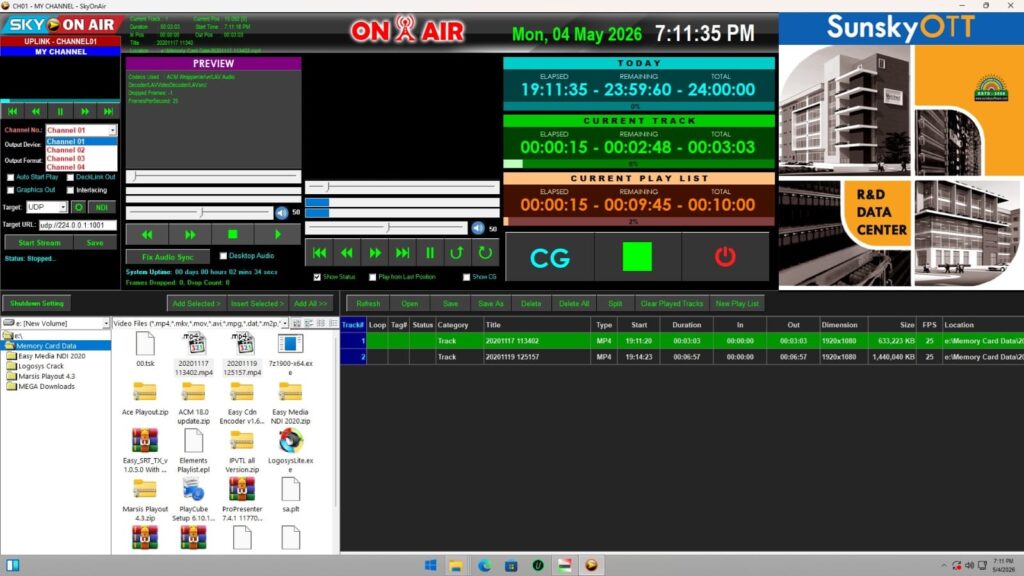
The core functionality of Sky Onair revolves around media management, scheduling, editing, and broadcast automation. Users can arrange content within playlists, create broadcast schedules, and manage on-air programming from a centralized interface.
The platform allows broadcasters to prepare content sequences, manage transitions, and coordinate programming for specific time slots. This structured workflow helps ensure consistent content delivery across television channels, online streams, and digital broadcasting platforms.
For teams handling daily broadcasts, Sky Onair simplifies routine tasks by automating repetitive operations. This reduces manual intervention and allows production staff to focus on content quality and audience engagement rather than technical management.
Step 4: Add Features (Effects, Tools, and Customization)
One of the strengths of Sky Onair is its flexibility and customization capabilities. Users can enhance broadcasts through various tools, visual effects, graphics overlays, and branding elements.
Common customization options include:
- Custom channel branding
- Logo insertion
- Lower-third graphics
- Text overlays
- Transition effects
- Playlist automation
- Scheduling tools
- Multi-format output support
These features help broadcasters create a professional viewing experience while maintaining consistent brand identity. Customization options are particularly valuable for television stations, streaming platforms, and media organizations that require polished visual presentation.
Additionally, advanced users can fine-tune workflows to match specific operational requirements, improving overall efficiency and productivity.
Step 5: Export / Save Output
After completing production tasks, users can export or broadcast content using Sky Onair’s output tools. Depending on project requirements, content can be prepared for live transmission, digital distribution, archiving, or future scheduling.
The export process typically includes selecting output formats, configuring quality settings, and defining destination channels or storage locations. Efficient output management helps ensure that media content maintains its quality throughout distribution.
For broadcasters handling large volumes of content, reliable export and delivery features are essential for maintaining smooth operations and meeting audience expectations.
Best Use Cases for Sky Onair
Sky Onair can serve a wide variety of media production and broadcasting environments. Its flexibility makes it suitable for both small organizations and large-scale broadcasting operations.
Some of the most common use cases include:
Television Broadcasting
Television networks can use Sky Onair for program scheduling, playlist management, automated broadcasting, and content distribution.
Live Streaming Operations
Organizations running online streaming channels can manage content delivery, automate broadcasts, and maintain consistent programming schedules.
Educational Broadcasting
Schools, universities, and training institutions can distribute educational content through managed broadcasting workflows.
Corporate Media Channels
Businesses can operate internal communication channels, corporate broadcasts, and event streaming using centralized media management tools.
Digital Media Production
Content creators and production companies can organize media assets, manage workflows, and prepare content for multiple distribution platforms.
Advantages and Limitations
Advantages
Sky Onair offers several benefits that make it attractive for media professionals and broadcasters.
- User-friendly interface
- Streamlined media management
- Broadcast automation capabilities
- Flexible scheduling tools
- Professional branding features
- Support for multiple media formats
- Improved workflow efficiency
- Scalable for different production sizes
- Centralized content control
- Reduced manual workload
These advantages help organizations save time while maintaining consistent production quality.
Limitations
Like any broadcasting solution, Sky Onair may have certain limitations depending on user requirements.
- Learning curve for advanced features
- Hardware requirements for larger operations
- May require staff training for optimal use
- Some workflows may need customization
- Feature availability can vary depending on deployment setup
Understanding these limitations helps organizations evaluate whether the platform aligns with their production needs and technical infrastructure.
Alternatives to Sky Onair
Although Sky Onair provides a comprehensive broadcasting solution, some users may wish to explore alternative platforms.
Popular alternatives include:
- OBS Studio
- vMix
- Wirecast
- PlayBox Neo
- CasparCG
- Cinegy Air
- Telestream solutions
- Livestream Studio
- XSplit Broadcaster
Each alternative offers unique features, pricing models, and workflow capabilities. Evaluating multiple options can help organizations identify the best solution for their specific broadcasting requirements.
Frequently Asked Questions (FAQs)
What is Sky Onair used for?
Sky Onair is primarily used for media management, broadcast automation, scheduling, and content delivery in television, streaming, and digital broadcasting environments.
Is Sky Onair suitable for beginners?
Yes. While advanced features may require some training, the platform is generally designed with usability in mind, making it accessible to beginners.
Can Sky Onair handle live broadcasts?
Yes. Sky Onair can support live broadcasting workflows alongside scheduled and automated content delivery.
Does Sky Onair support multiple media formats?
Most modern broadcasting platforms, including Sky Onair, are designed to work with various video, audio, and graphic formats to ensure flexible content management.
Who can benefit from using Sky Onair?
Broadcasters, streaming operators, media production companies, educational institutions, and corporate communication teams can all benefit from using Sky Onair.
Conclusion
Sky Onair is a powerful broadcasting and media management solution designed to simplify content scheduling, automation, and delivery. By combining workflow efficiency, flexible customization options, and centralized control, it helps organizations manage complex broadcasting operations more effectively.
Whether you’re running a television channel, managing live streams, or overseeing digital media production, Sky Onair offers tools that can improve productivity and streamline daily operations. While it may require some initial learning and setup, its long-term benefits make it a valuable option for professionals seeking reliable broadcast management software.
Download
Telegram ID
eMail