GoPlayout 2026: A Complete Guide to Professional Broadcast Automation and Channel Playout Introduction
In the world of television broadcasting, live streaming, and media distribution, reliable playout automation software is essential for maintaining a smooth and professional viewing experience. GoPlayout is a powerful broadcast automation solution designed to help television stations, streaming channels, and media organizations manage and schedule content efficiently.
Whether you are launching a new TV channel, operating a local broadcasting station, or managing online streaming content, GoPlayout offers the tools needed to automate daily operations while reducing manual workload. This guide explores how to use GoPlayout, its key features, advantages, limitations, and the best use cases for broadcasters looking for an affordable and dependable playout solution.
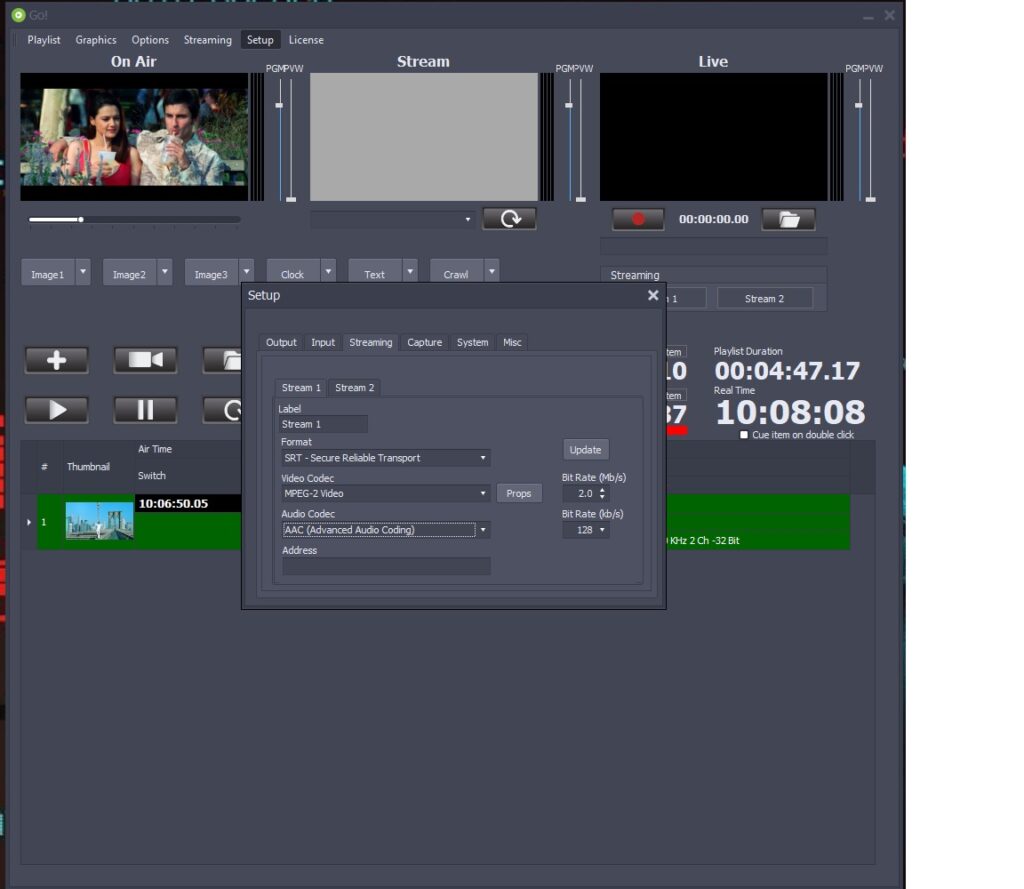
Step 1: Create a New Project
Getting started with GoPlayout begins by creating a new channel or playout project. The software provides a straightforward setup process that allows users to define their channel configuration, scheduling preferences, and output settings. During project creation, broadcasters can establish channel branding elements, playback rules, and automation preferences that will control daily operations.
A well-structured project setup is important because it forms the foundation for reliable content delivery. Users can configure video standards, frame rates, audio settings, and playlist behavior according to their broadcasting requirements. Proper project creation ensures smoother scheduling and minimizes operational issues later in the workflow.
Step 2: Import Media / Setup
Once the project has been created, the next step is importing media assets into the system. GoPlayout supports a variety of video formats commonly used in broadcasting environments. Users can organize media files into folders, categories, or libraries for easier access during scheduling and playback operations.
During the setup phase, broadcasters can also configure storage locations, media databases, and backup systems. Proper media organization helps operators quickly locate content while maintaining an efficient workflow. Metadata such as titles, durations, descriptions, and categories can be added to improve content management and search functionality within the platform.
Step 3: Main Workflow
The core workflow in GoPlayout revolves around scheduling, automation, and content playback. Users create playlists that determine what content will be broadcast and when it will air. These playlists can be scheduled days, weeks, or even months in advance, making channel management significantly more efficient.
Operators can arrange programs, commercials, promotional videos, and station identifications within a timeline. The automation engine then handles playback according to the schedule. This reduces manual intervention while ensuring accurate timing. For broadcasters managing multiple programs daily, GoPlayout streamlines operations and improves overall channel reliability.
Step 4: Add Features (Effects, Tools, and Customization)
GoPlayout includes several customization options that allow broadcasters to enhance their channel presentation. Users can add logos, lower-thirds, station branding graphics, and overlay elements to create a professional on-air appearance. These tools help maintain consistent branding across all broadcasts.
Additional features may include:
- Automated playlist generation
- Scheduled commercial insertion
- Live event switching
- Graphics overlays
- Emergency content playback
- Channel branding tools
- Multi-format media support
These customization capabilities make GoPlayout suitable for both small broadcasters and larger media organizations seeking flexible playout automation solutions.
Step 5: Export / Save Output
After playlists and schedules have been configured, GoPlayout delivers the final broadcast output through supported transmission methods. The software can output content for traditional television broadcasting, IP streaming, online channels, or internal media distribution systems.
Users can save schedules, export playlists, and maintain backups for future use. Proper export and archiving procedures help broadcasters preserve content history and quickly restore operations when needed. The ability to manage output efficiently contributes to uninterrupted broadcasting and professional content delivery.
Best Use Cases for GoPlayout
GoPlayout serves a wide range of broadcasting applications. Its flexibility makes it suitable for organizations of various sizes and technical requirements.
Some common use cases include:
- Television channel automation
- Community TV stations
- Educational broadcasting networks
- Religious broadcasting channels
- Corporate communication channels
- Internet TV and OTT platforms
- Live event broadcasting
- Digital signage networks
Because of its automation capabilities, GoPlayout is particularly valuable for channels that require continuous 24/7 operation with minimal manual supervision.
Advantages and Limitations
Every broadcast automation platform has strengths and weaknesses. Understanding these factors helps organizations determine whether GoPlayout meets their operational needs.
Advantages
One of the biggest strengths of GoPlayout is its automation-focused design. Broadcasters can schedule content in advance, reducing the need for constant operator involvement. This improves efficiency and lowers operational costs while maintaining consistent programming.
Additional advantages include:
- Easy-to-manage scheduling system
- Reliable automated playback
- Professional channel branding tools
- Support for various media formats
- Suitable for 24/7 broadcasting
- Reduced manual workload
- Scalable for growing operations
Its flexibility allows both small and medium-sized broadcasters to establish professional-grade playout workflows without excessive complexity.
Limitations
Despite its benefits, GoPlayout may not be the ideal solution for every organization. Larger broadcast networks with highly specialized requirements may need additional integrations or enterprise-level features beyond standard playout automation.
Potential limitations include:
- Learning curve for new broadcast operators
- Advanced configurations may require technical expertise
- Certain enterprise features may depend on specific deployments
- Hardware requirements can vary based on channel complexity
Organizations should carefully evaluate their broadcasting goals and infrastructure before deployment.
Alternatives to GoPlayout
While GoPlayout is a capable broadcast automation solution, several alternatives are available in the market.
Popular alternatives include:
- CasparCG
- Cinegy Air
- PlayBox Neo
- BroadStream OASYS
- Channel Studio
- Etere
- Imagine Communications Versio
- Harmonic Spectrum X
Each platform offers different levels of automation, scalability, cloud integration, and workflow customization. The best choice depends on budget, technical requirements, and broadcasting objectives.
Frequently Asked Questions (FAQs)
What is GoPlayout used for?
GoPlayout is a broadcast automation and channel playout system used to schedule, manage, and automate television and streaming content delivery.
Is GoPlayout suitable for small TV stations?
Yes. GoPlayout is often used by small and medium-sized broadcasters because it provides efficient automation and scheduling capabilities without excessive complexity.
Can GoPlayout support 24/7 broadcasting?
Yes. The GoPlayout 2026 Dual stream Srt ndi also updated software is designed to automate continuous channel operations, making it suitable for round-the-clock broadcasting environments.
Does GoPlayout support multiple media formats?
Yes. Broadcasters can typically work with various video formats depending on their deployment configuration and workflow requirements.
Can GoPlayout be used for online streaming?
Yes. Many organizations use GoPlayout for internet television, OTT platforms, and live streaming operations in addition to traditional broadcasting.
Conclusion
GoPlayout is a dependable and flexible broadcast automation platform that helps television stations, streaming providers, and media organizations simplify channel management. With its scheduling tools, automated playback capabilities, media organization features, and branding options, it provides the functionality needed to maintain professional broadcasting operations.
Whether you are managing a local television station, launching an online channel, or seeking a reliable playout automation solution, GoPlayout offers a practical workflow that can improve efficiency and reduce operational complexity. By understanding its features, advantages, and limitations, broadcasters can determine whether GoPlayout is the right choice for their content delivery needs.
Download
Telegram ID
eMail