Central Control Studio: A Complete Guide to Professional Broadcast Management and Production
Central Control Studio is a powerful broadcast management and production solution designed to simplify complex workflows in television, live streaming, digital broadcasting, and media operations. It provides broadcasters, production teams, and content creators with centralized control over various production elements, helping them manage media assets, automate workflows, and maintain efficient operations.
Whether you are managing a television station, coordinating live events, or running a professional streaming environment, Central Control Studio offers a streamlined platform that improves productivity and reduces operational complexity. This guide explores its workflow, features, benefits, limitations, and ideal use cases to help you understand how the software can fit into your production environment.
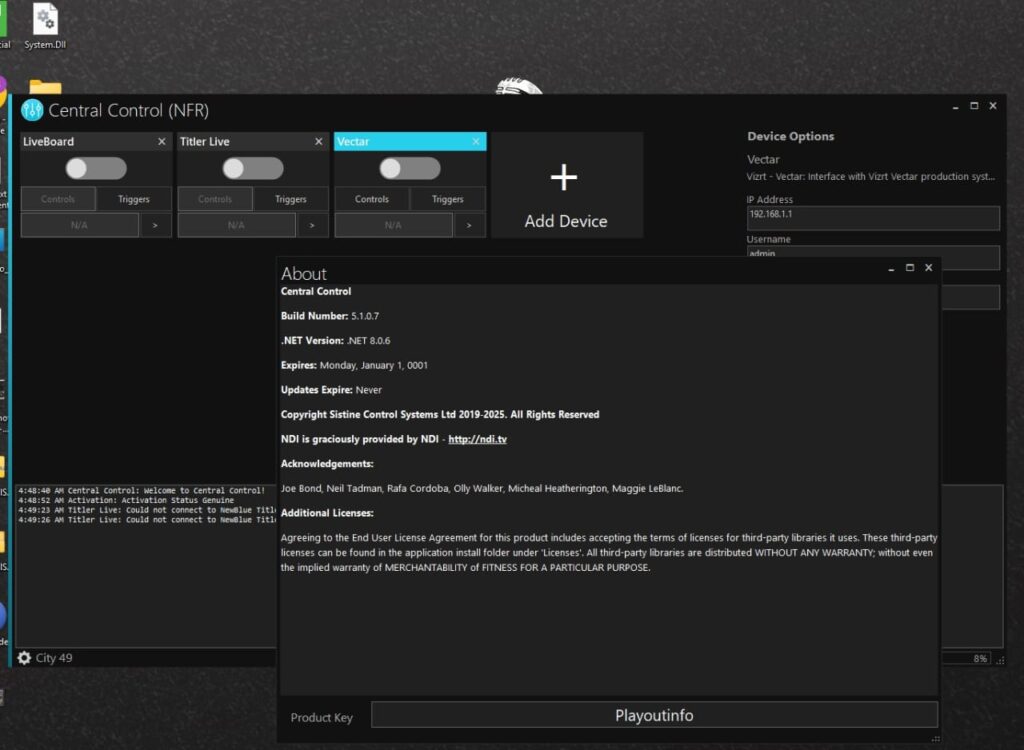
Step 1: Create a New Project
Getting started with Central Control Studio begins with creating a new project. The software provides a structured environment where users can organize production resources, media assets, schedules, and workflow settings. During project creation, users can define project parameters such as output formats, production requirements, and team collaboration settings.
A well-organized project structure ensures that all assets remain accessible throughout the production process. This approach helps reduce confusion, especially when managing large-scale broadcasts involving multiple operators, departments, and media sources. The intuitive project setup process makes it suitable for both experienced broadcasters and newcomers to professional production environments.
Step 2: Import Media / Setup
Once the project has been created, the next step involves importing media and configuring the production environment. Central Control Studio supports a wide range of media formats, allowing users to bring in video clips, graphics, audio files, templates, and other production resources.
The setup process also includes configuring production devices, network connections, automation settings, and output destinations. Users can organize imported content into categories and folders for easier access during live production. Proper setup ensures smoother workflow execution and minimizes the risk of technical issues during broadcasts or live events.
Step 3: Main Workflow
The primary workflow within Central Control Studio focuses on managing and controlling various production tasks from a centralized interface. Operators can coordinate media playback, monitor incoming feeds, schedule content, and control broadcast operations from a single dashboard.
The centralized design helps production teams maintain consistency across different channels and outputs. Users can quickly switch between tasks, monitor system status, and respond to real-time production requirements without navigating multiple software platforms. This workflow efficiency is particularly valuable in fast-paced broadcast environments where timing and reliability are critical.
Workflow Highlights
- Centralized production control
- Media asset management
- Real-time monitoring
- Broadcast scheduling
- Multi-source coordination
- Workflow automation support
These capabilities help streamline day-to-day production activities while reducing manual intervention.
Step 4: Add Features (Effects, Tools, and Customization)
One of the key strengths of Central Control Studio is its extensive customization and feature set. Users can tailor the software to match specific production requirements, making it suitable for a variety of broadcasting scenarios.
The platform includes tools for workflow automation, production monitoring, system integration, and resource management. Customizable layouts allow operators to arrange control panels according to their preferences, improving efficiency and usability. Additional effects, overlays, graphics integration, and advanced control options further enhance production quality.
Key customization options include:
- Personalized workspace layouts
- Automated workflow triggers
- Graphics and branding integration
- Device control management
- User permission settings
- Multi-user collaboration tools
These features enable production teams to build workflows that align with their operational needs.
Step 5: Export / Save Output
After production tasks are completed, Central Control Studio allows users to export or save output according to project requirements. The software supports multiple output destinations, making it suitable for television broadcasting, online streaming, archiving, and content distribution.
Users can configure output settings to match quality standards and delivery specifications. Export options typically include different resolutions, formats, and broadcast-compatible configurations. This flexibility ensures that content can be distributed efficiently across various platforms while maintaining professional production quality.
Best Use Cases for Central Control Studio
Central Control Studio serves a wide range of professional media and broadcasting environments. Its centralized management capabilities make it particularly useful for organizations that require reliable production control and workflow automation.
Common use cases include:
- Television station operations
- Live event broadcasting
- News production environments
- Multi-channel broadcasting
- Sports production management
- Corporate media departments
- Educational broadcasting systems
- Online streaming networks
Organizations handling large volumes of media assets and production tasks can benefit significantly from its centralized workflow structure.
Advantages and Limitations
Like any professional software solution, Central Control Studio offers numerous benefits while also presenting certain limitations depending on the user’s needs and environment.
Advantages
Central Control Studio provides a comprehensive set of tools that improve production efficiency and operational control. Its centralized architecture reduces workflow complexity and helps teams manage multiple tasks from a single interface.
Major advantages include:
- Centralized broadcast management
- Improved workflow efficiency
- Professional-grade production tools
- Flexible customization options
- Multi-user collaboration support
- Reliable automation capabilities
- Scalable deployment for various production sizes
- Enhanced operational visibility
These strengths make it a valuable solution for professional broadcasting organizations seeking streamlined production management.
Limitations
Despite its capabilities, Central Control Studio may not be ideal for every user or production environment. Some organizations may encounter challenges related to implementation, training, or infrastructure requirements.
Potential limitations include:
- Learning curve for beginners
- May require dedicated hardware resources
- Advanced features can be complex initially
- Setup time may vary based on production scale
- Some integrations may require additional configuration
Understanding these limitations helps organizations prepare for successful deployment and adoption.
Alternatives to Central Control Studio
While Central Control Studio is a strong solution for centralized production management, several alternatives are available depending on workflow requirements and budget considerations.
Popular alternatives include:
- Vizrt solutions
- Ross Video production systems
- Grass Valley broadcast platforms
- PlayBox Neo broadcasting software
- Cinegy workflow solutions
- Imagine Communications systems
- Evertz broadcast management tools
Each alternative offers unique strengths, so evaluating features, scalability, and integration capabilities is important before making a decision.
Frequently Asked Questions (FAQs)
What is Central Control Studio used for?
Central Control Studio is used for managing broadcast operations, production workflows, media assets, scheduling, and centralized control of broadcasting systems.
Is Central Control Studio suitable for live broadcasting?
Yes. The platform is designed to support live broadcasting environments, offering real-time monitoring and operational control features.
Can multiple users work within Central Control Studio?
Yes. The Central Control Studio software supports multi-user environments, allowing production teams to collaborate efficiently across different tasks.
Does Central Control Studio support workflow automation?
Yes. Automation features help reduce manual tasks, improve efficiency, and ensure consistent production processes.
Is Central Control Studio beginner-friendly?
While the interface is designed to be user-friendly, new users may require some training to fully utilize advanced features and workflow options.
What industries can benefit from Central Control Studio?
Broadcasting companies, television stations, streaming services, educational institutions, corporate media departments, and event production teams can all benefit from its capabilities.
Conclusion
Central Control Studio is a powerful and flexible broadcast management platform designed to simplify complex production workflows. By centralizing media management, scheduling, automation, and operational control, it helps organizations improve efficiency and maintain professional production standards.
Its combination of workflow automation, customization options, and centralized management capabilities makes it a strong choice for television broadcasters, live production teams, and digital media organizations. While there may be a learning curve for new users, the long-term benefits of streamlined operations and improved workflow management make Central Control Studio a valuable solution for modern broadcast environments.
Download
Telegram ID
eMail