Amigo News Playout 2026: A Practical Guide to News Broadcasting and Playout Workflows
In modern television broadcasting, reliable playout software is essential for delivering news, programs, graphics, advertisements, and other media content smoothly. Amigo News Playout is designed around the needs of news-oriented broadcasting environments, where organized media handling, playlist management, graphics integration, and dependable output are important.
For broadcasters looking for a practical news playout workflow, understanding how to set up a project, manage media, build playlists, customize content, and prepare final output can make daily operations much easier. This guide explains the typical Amigo News Playout workflow in a beginner-friendly way.
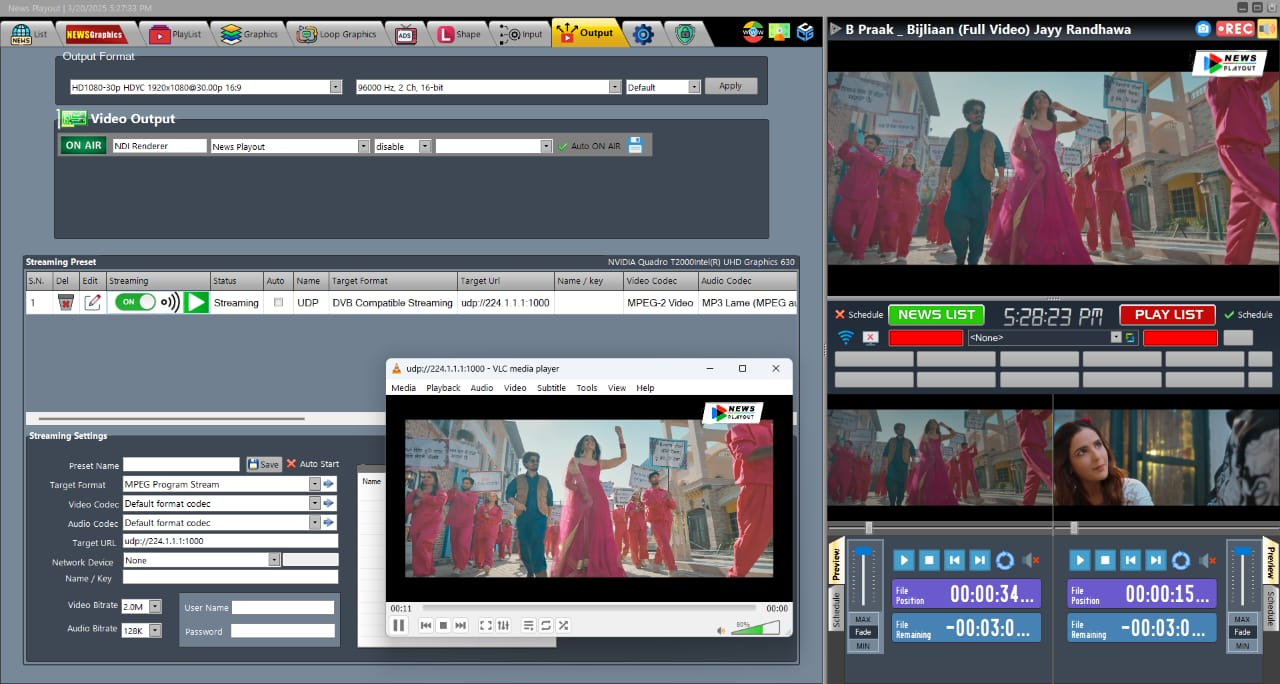
Step 1: Create a New Project 2026
The first step in an Amigo News Playout workflow is creating a new project for your broadcast operation. A project provides an organized workspace where media assets, playlists, graphics, and other production elements can be managed.
Start by defining the basic requirements of the channel or news production. Depending on your broadcasting environment, this may include the output format, channel configuration, media folders, and operational preferences.
A well-organized project structure can save considerable time later. News channels frequently work with changing stories, updated videos, breaking-news material, commercials, and scheduled programs, so keeping content properly categorized is particularly important.
When creating a project, consider organizing content into categories such as:
- News packages
- Live segments
- Commercials
- Promos
- Station IDs
- Background videos
- Graphics and logos
- Recorded programs
Step 2: Import Media / Setup
Once the project is created, the next stage is importing and organizing the required media. Amigo News Playout workflows depend on having the correct video and audio assets available before building a broadcast playlist.
Media should be stored in a logical folder structure so operators can locate content quickly. This is especially useful in a newsroom, where content can change several times throughout the day.
Before putting media into a playlist, check important details such as file compatibility, duration, audio levels, resolution, and naming. Consistent file names can make it much easier for operators to identify the correct story or segment.
A useful setup may include:
- Main news footage
- Report packages
- Interview clips
- Commercial breaks
- Channel branding
- News intros and outros
- Emergency or backup content
Proper preparation helps reduce mistakes during live broadcasting and makes the overall playout process more efficient.
Step 3: Main Workflow
The main workflow of Amigo News Playout revolves around arranging media in the correct broadcast sequence. Operators can prepare playlists according to the channel’s daily schedule and update them when new content becomes available.
A typical news playout sequence might include an opening animation, headlines, news packages, advertisements, interviews, and transitions into another segment. The playlist needs to reflect the actual running order so that content can be played consistently.
News broadcasting also requires flexibility. A scheduled story may need to be replaced at short notice because a breaking story has become more important. A well-managed playout workflow allows operators to make these changes without unnecessarily disrupting the rest of the schedule.
For beginners, the best approach is to build the playlist carefully and verify every item before going on air. Pay particular attention to:
- Correct media order
- Clip duration
- Audio and video quality
- Break timing
- Graphics placement
- Program transitions
- Backup content
Step 4: Add Features
A professional news playout system is more than a simple video player. Customization and supporting tools can help broadcasters create a more polished and consistent channel presentation.
Depending on the available configuration, operators may integrate branding elements such as logos, titles, lower-thirds, promotional graphics, and other visual components into their workflow.
For news channels, customization is particularly valuable because branding needs to remain consistent across different types of programming. Graphics can help viewers identify programs, presenters, stories, and other important information.
Useful customization areas may include:
- Channel logos
- Lower-third graphics
- News headlines
- Program titles
- Breaking-news elements
- Promotional graphics
- Transitions
- On-screen branding
The exact features available can vary depending on the software version and broadcasting setup, so operators should configure the system according to their production requirements.
Step 5: Export / Save Output
After the playlist and associated content have been prepared, the final stage is saving the project and preparing the broadcast output. In a professional broadcasting environment, this step requires careful checking because errors can affect the channel’s on-air presentation.
Before finalizing a playlist, review the sequence from beginning to end. Confirm that the correct media is assigned to each position and that scheduled breaks and transitions occur at the intended points.
It is also good practice to maintain backup copies of important playlists and production assets. News environments can change rapidly, so having reliable backups can help operators recover from unexpected technical or operational problems.
The final output should be checked for:
- Correct video format
- Audio consistency
- Playlist timing
- Graphics and branding
- Media availability
- Output configuration
- Backup readiness
Best Use Cases for Amigo News Playout
Amigo News Playout can be particularly useful in environments where broadcasters need organized and repeatable media playout workflows.
Potential use cases include:
- Television news channels
- Local news stations
- Regional broadcasters
- Community television
- Corporate news channels
- Recorded news programming
- Promotional broadcasting
- Scheduled video channels
Its workflow can be adapted to different operational requirements, making proper configuration and content organization important factors in achieving reliable results.
Advantages and Limitations
Advantages
A news-focused playout workflow can provide several practical benefits for broadcasters and operators.
Organized media management: Properly structured playlists make it easier to manage large amounts of broadcast content.
Efficient scheduling: Operators can prepare content in advance and organize it according to the daily programming schedule.
Newsroom flexibility: News content can change quickly, so a flexible playlist workflow is useful when stories need to be updated or replaced.
Consistent branding: Graphics, logos, and other presentation elements can help maintain a professional channel identity.
Beginner-friendly workflow: A clearly structured playout process can be easier for new operators to understand and manage.
Limitations
Like any broadcasting solution, Amigo News Playout may have limitations depending on the specific installation, version, hardware, and production requirements.
Broadcasters should evaluate factors such as supported media formats, automation requirements, graphics capabilities, integration options, hardware compatibility, and scalability before adopting it for a larger operation.
Operators may also require training to manage more advanced workflows efficiently, particularly in live news environments where changes can happen rapidly.
Alternatives to Amigo News Playout
Broadcasters evaluating Amigo News Playout may also consider other professional playout and broadcast automation solutions. The right choice depends on channel size, workflow complexity, automation requirements, graphics integration, supported formats, and available hardware.
When comparing alternatives, consider:
- Playlist and scheduling capabilities
- Broadcast automation
- Graphics integration
- Multi-channel support
- Media format compatibility
- Live production requirements
- System reliability
- Ease of operation
- Scalability
A practical comparison should focus on the actual requirements of the broadcasting operation rather than selecting software based only on its feature list.
Frequently Asked Questions (FAQs)
What is Amigo News Playout?
Amigo News Playout is a broadcast-oriented playout solution designed for organizing and delivering news and other scheduled media content. Its workflow can involve media management, playlists, graphics, scheduling, and broadcast output.
Who can use Amigo News Playout?
It can be suitable for broadcasters, news channels, local television stations, production teams, and other organizations that require structured media playout.
Is Amigo News Playout suitable for beginners?
A properly configured system can be approachable for beginners. New operators should first learn media management, playlist creation, scheduling, and basic broadcast procedures before handling more complex workflows.
What content can be managed in a news playout workflow?
Depending on the system configuration, a broadcaster may manage news packages, interviews, commercials, promos, station branding, recorded programs, and other scheduled media.
Why is playlist organization important in news broadcasting?
News schedules can change quickly. A well-organized playlist helps operators identify content, make updates, manage timing, and maintain a consistent broadcast sequence.
Conclusion
Amigo News Playout Software 2026 provides a structured approach to managing news-oriented broadcast content, from creating a project and importing media to organizing playlists, customizing presentation elements, and preparing final output. For broadcasters, an effective workflow is just as important as the software itself.
By keeping media organized, checking playlists carefully, maintaining backups, and preparing content before transmission, operators can create a more consistent and manageable broadcasting environment. Whether used for a local news operation or a larger scheduled media workflow, understanding the fundamentals of Amigo News Playout can help users build an efficient and professional playout process.
Download Amigo News Playout 2026
Telegram ID
eMail
Request for One Day Pro Demo For Free Pro Demo Download