IP Multiviewer Monitoring System Video Wall 2026: Complete Setup Guide, Features, Benefits, and Best Practices
An IP Multiviewer Monitoring System Video Wall has become an essential solution for modern broadcast studios, security control rooms, network operation centers, live production environments, and corporate monitoring facilities. As organizations continue shifting toward IP-based workflows, managing multiple video feeds efficiently has become more important than ever.
Whether you’re monitoring live cameras, streaming channels, production outputs, or network sources, an IP Multiviewer Monitoring System Video Wall helps display multiple video streams on a single screen or across a large video wall. This guide explains everything from project setup to exporting configurations, along with its advantages, limitations, and practical use cases.

Step 1: Create a New Project
The first step is creating a new monitoring project based on your operational requirements. Most IP multiviewer platforms provide an intuitive dashboard where users can define screen layouts, display resolution, and workspace settings.
Start by selecting the desired video wall dimensions and choosing the number of displays you plan to use. You can also organize your project into different monitoring groups for various departments, making it easier to manage multiple video sources while maintaining a clean and professional monitoring environment.
Step 2: Import Media / Setup
Once the project is created, it’s time to connect your IP video sources. An IP Multiviewer Monitoring System Video Wall typically supports multiple protocols such as SRT, NDI, RTSP, MPEG-TS, UDP, and various IP streaming formats depending on the platform.
Configure each video input by entering the appropriate stream information and assigning meaningful labels. Organizing feeds by department, channel, location, or production stage improves workflow efficiency and makes monitoring easier during live operations. Verify network connectivity before finalizing the setup to ensure stable video transmission.
Step 3: Main Workflow
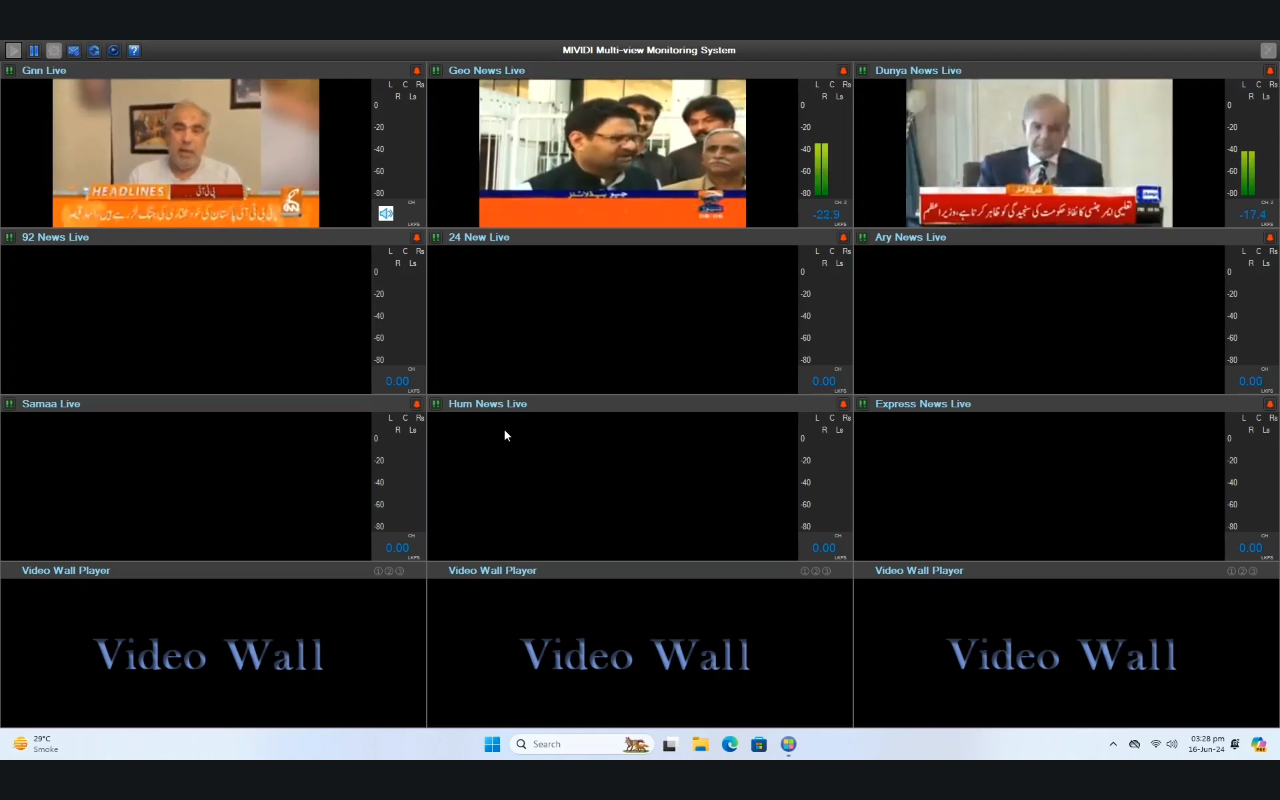
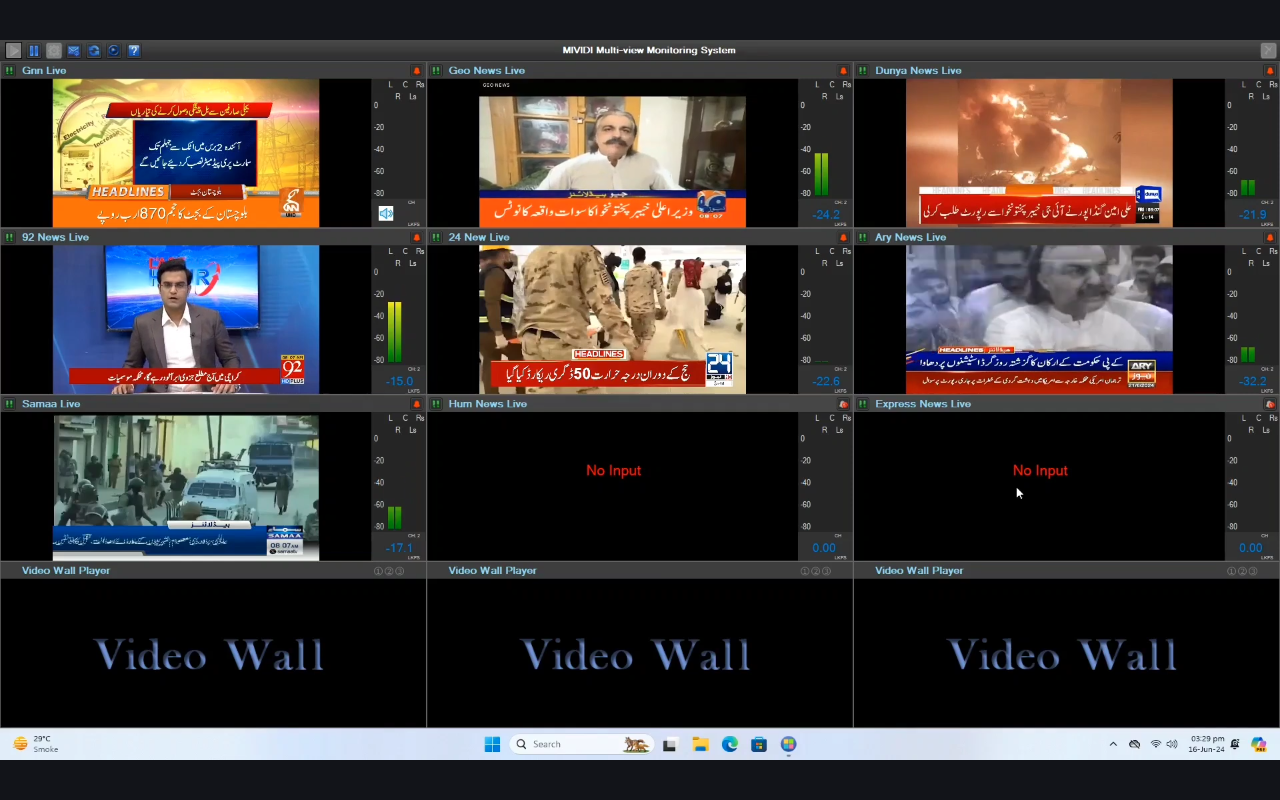
The primary workflow involves arranging, monitoring, and managing multiple live video streams simultaneously. Users can drag and resize video windows, create custom layouts, and switch between different monitoring profiles depending on operational needs.
Most professional systems allow operators to monitor dozens or even hundreds of video sources at once without requiring multiple dedicated monitors. Real-time video playback, source health monitoring, and instant visual feedback help technical teams quickly identify issues before they affect production or broadcasting.
Step 4: Add Features (Effects, Tools, and Customization)
Modern IP multiviewer platforms include numerous customization options that improve both usability and monitoring accuracy. Users can personalize the interface to match specific operational workflows.
Popular customization features include:
- Custom screen layouts
- Dynamic window resizing
- UMD labels and source names
- Audio level meters
- Clock and timer overlays
- Alarm notifications
- Signal loss detection
- Border color customization
- Full-screen preview mode
- Multi-screen synchronization
- User access management
- Preset layout switching
These tools help operators monitor critical information efficiently while maintaining an organized and easy-to-read display environment.
Step 5: Export / Save Output
After completing the layout configuration, save your project so it can be loaded instantly whenever needed. Most systems allow users to store multiple presets for different production scenarios, control rooms, or monitoring tasks.
Some advanced platforms also support exporting configuration files for backup purposes or deployment across multiple monitoring stations. Regularly saving your project ensures quick recovery in case of system updates or hardware replacement.
Best Use Cases for IP Multiviewer Monitoring System Video Wall
An IP Multiviewer Monitoring System Video Wall serves many industries where monitoring multiple live video feeds is essential for operational success.
Common applications include:
- Broadcast television studios
- Live event production
- Master control rooms
- Security surveillance centers
- Network operation centers (NOCs)
- Data centers
- Sports broadcasting
- Government monitoring facilities
- Transportation control rooms
- Smart city monitoring
- Corporate command centers
- Educational media production
These environments rely on continuous video monitoring, making IP multiviewer technology an indispensable operational tool.
Advantages and Limitations
Advantages
Using an IP Multiviewer Monitoring System Video Wall offers numerous benefits for organizations transitioning to IP-based infrastructure.
Key advantages include:
- Centralized monitoring of multiple video sources
- Flexible and customizable screen layouts
- Reduced hardware requirements
- Excellent scalability for growing operations
- Real-time monitoring with low latency
- Support for multiple IP streaming protocols
- Simplified cable management
- Improved operational efficiency
- Easy integration with existing broadcast systems
- Better situational awareness for operators
These benefits make IP multiviewers a valuable investment for professional monitoring environments.
Limitations
Although highly capable, every monitoring solution has certain limitations that should be considered before deployment.
Potential limitations include:
- High network bandwidth requirements
- Initial configuration may require technical expertise
- Performance depends on network quality
- Some advanced features require premium licensing
- Hardware specifications can affect overall performance
- Large deployments may require careful network planning
Understanding these considerations helps organizations build a more reliable monitoring infrastructure.
Alternatives to IP Multiviewer Monitoring System Video Wall
Depending on your workflow requirements, several alternative monitoring solutions are available. Some organizations prefer hardware-based multiviewers, while others choose playout software-defined monitoring platforms for greater flexibility.
Popular alternatives include:
- Hardware HDMI multiviewers
- SDI multiviewer systems
- NDI-based monitoring platforms
- Broadcast video processors
- Matrix switcher monitoring systems
- Cloud-based multiviewer solutions
- Control room visualization software
- Enterprise video wall management platforms
The best choice depends on budget, scalability requirements, supported protocols, and existing production infrastructure.
Frequently Asked Questions (FAQs)
What is an IP Multiviewer Monitoring System Video Wall?
It is a professional monitoring solution that displays multiple IP video software streams simultaneously on one or more screens, allowing operators to supervise numerous sources from a centralized interface.
Who uses an IP Multiviewer Monitoring System Video Wall?
Broadcast companies, security organizations, government agencies, network operation centers, educational institutions, transportation authorities, and corporate control rooms commonly use these systems.
Does an IP multiviewer support different streaming protocols?
Yes. Most professional systems support multiple protocols such as NDI, SRT, RTSP, MPEG-TS, UDP, and other IP-based video formats depending on the software.
Can the display layout be customized?
Yes. Users can create fully customized layouts by resizing video windows, adding labels, configuring alarms, and saving multiple monitoring presets.
Is an IP Multiviewer suitable for large video walls?
Absolutely. Many enterprise-grade solutions are designed specifically for large-scale video walls supporting multiple displays and hundreds of simultaneous video sources.
Does it require powerful hardware?
The hardware requirements depend on the number of video streams, display resolution, and supported codecs. Larger installations generally require more powerful processing resources.
Conclusion
An IP Multiviewer Monitoring System Video Wall is an essential technology for organizations that need reliable, centralized monitoring of multiple video sources. Its flexibility, scalability, and support for modern IP workflows make it an ideal solution for broadcast production, security operations, network monitoring, and enterprise control rooms.
By following the proper setup process, organizing video sources efficiently, and taking advantage of customization features, users can build a monitoring environment that improves productivity and operational awareness. Whether you’re managing a small monitoring station or a large enterprise video wall, investing in a professional IP multiviewer solution can significantly enhance workflow efficiency while preparing your infrastructure for the future of IP-based video operations.
Download
Telegram ID
eMail