Metus Player 3.7.0.7: A Complete Guide to Professional Broadcast Media Playback
Introduction
Metus Player 3.7.0.7 is a professional media playback solution designed for broadcasters, production studios, and media professionals who require reliable video and audio playback. Whether you are preparing content for live television, managing video assets during a production, or reviewing media before broadcasting, Metus Player offers an efficient and user-friendly platform for handling multiple media formats with precision.
Unlike standard media players, Metus Player 3.7.0.7 is built for professional workflows where stability, compatibility, and smooth playback are essential. It supports high-quality media files and integrates well into broadcast environments, making it a valuable tool for television channels, production houses, educational institutions, and corporate media departments. This guide explains how to use Metus Player effectively, its advantages, limitations, and the scenarios where it performs best.

Step 1: Create a New Project
The first step when using Metus Player is setting up a new project or playback session. Starting with an organized project makes it easier to manage media assets and maintain an efficient workflow throughout your production. Depending on your broadcast requirements, you can configure playback preferences, screen layouts, and output settings before adding any media.
Creating a structured project also minimizes errors during live playback. Organizing clips into logical groups ensures quick access to files when timing is critical. This preparation is especially useful for television broadcasts, presentations, live events, and newsroom environments where smooth operation is a priority.
Step 2: Import Media / Setup
After creating your project, the next step is importing your media files into Metus Player 3.7.0.7. The software supports numerous professional video and audio formats, allowing users to work with content from different cameras, editing systems, and production workflows without unnecessary conversion.
Once the media is imported, verify playback quality and organize clips according to your production sequence. Naming files clearly and arranging playlists in advance helps operators locate content instantly during live productions. Proper setup also reduces the chance of playback interruptions and improves overall production efficiency.
Step 3: Main Workflow
The primary workflow in Metus Player focuses on smooth and dependable media playback. Users can preview clips, manage playlists, switch between different media files, and monitor playback performance with minimal effort. The intuitive interface helps both beginners and experienced operators navigate projects quickly.
For broadcast professionals, maintaining accurate timing is essential. Metus Player enables operators to prepare multiple clips ahead of time and execute playback when required. This streamlined workflow makes the software suitable for live television broadcasts, sports productions, news programs, corporate events, digital signage, and educational presentations.
Step 4: Add Features (Effects, Tools, and Customization)
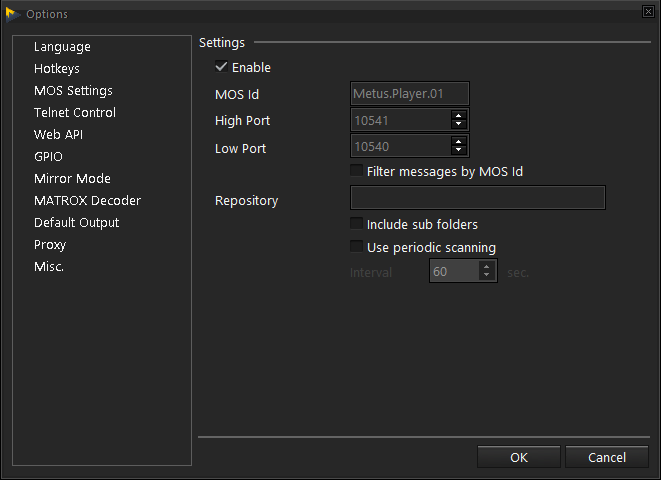
Metus Player includes several useful features that improve playback flexibility and production control. Users can customize playback settings according to their workflow, configure display options, and organize playlists for faster operation. These customization tools help production teams adapt the software to different broadcast environments.
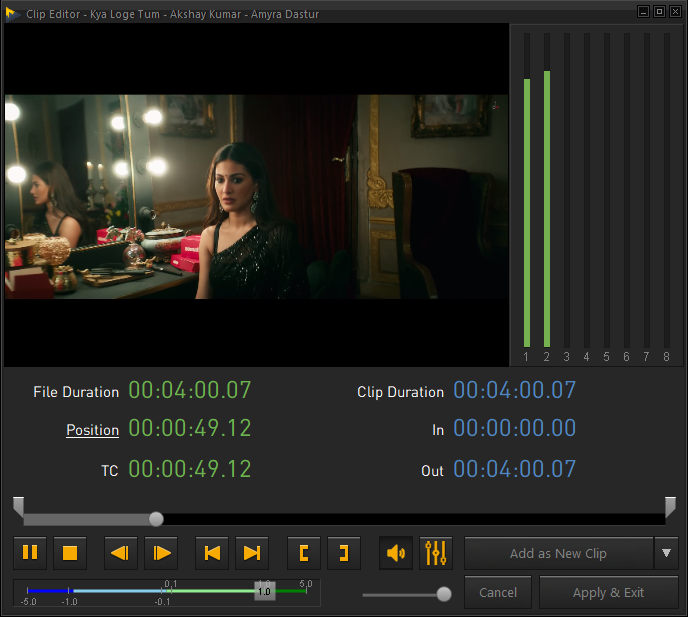
Additional playback controls make handling large media libraries much easier. Users can review footage, navigate timelines efficiently, and prepare media before going live. Depending on the production environment, playback preferences can be adjusted to match specific operational requirements while maintaining stable performance throughout the broadcast.
Step 5: Export / Save Output
After completing your playback session or reviewing media, you can save project configurations for future use. Saving playlists and playback settings eliminates the need to recreate similar projects repeatedly, improving productivity for recurring broadcasts and scheduled productions.
Maintaining organized project files also simplifies collaboration between multiple operators. Teams can quickly reopen previous configurations, verify media arrangements, and prepare broadcasts with greater confidence. Proper project management ultimately saves time and contributes to a more efficient production workflow.
Best Use Cases for Metus Player
Metus Player is suitable for a wide variety of professional media environments where dependable playback is essential. Some of its most common applications include:
- Television broadcasting
- Live news production
- Sports event coverage
- Corporate presentations
- Educational media playback
- Studio production environments
- Digital signage systems
- Video content review
- Media quality control
- Event production and conferences
Its flexibility allows organizations of different sizes to integrate the software into their existing broadcast workflows without major changes.
Advantages and Limitations
Advantages
Metus Player offers several benefits that make it a practical choice for professional media playback.
- Professional-grade playback performance
- Supports numerous media formats
- Stable operation during live productions
- Easy-to-use interface for beginners
- Efficient playlist management
- Suitable for broadcast environments
- Reliable media preview capabilities
- Organized workflow for production teams
- Flexible playback customization
- Helps improve operational efficiency
Limitations
While Metus Player provides many useful features, users should also understand its limitations.
- Advanced broadcast features may require experience.
- Some workflow configurations involve an initial learning curve.
- Enterprise deployments may require additional system planning.
- Feature availability may depend on the software edition being used.
- Best performance is achieved on systems that meet recommended hardware specifications.
Alternatives to Metus Player
If your workflow requires different capabilities or you want to compare available options, consider these alternatives:
- Cinegy Player
- VLC Media Player
- CasparCG
- PlayBox Neo
- Ross Video solutions
- Softron MovieRecorder and MoviePlayer
- Telestream playback solutions
- OBS Studio (for specific playback scenarios)
- vMix
- Imagine Communications broadcast solutions
Each alternative serves different production requirements, so choosing the right solution depends on your workflow, hardware infrastructure, and broadcasting needs.
Frequently Asked Questions (FAQs)
What is Metus Player?
Metus Player is a professional media playback application designed for broadcast, production, and professional video environments where reliable playback is required.
Who should use Metus Player?
It is ideal for broadcasters, television stations, production companies, corporate media teams, educational institutions, and professionals managing high-quality video playback.
Does Metus Player support multiple media formats?
Yes. Metus Player is designed to work with a wide variety of professional video and audio formats, making it suitable for modern production workflows.
Is Metus Player beginner-friendly?
Yes. Its interface is relatively easy to learn while still providing advanced functionality for experienced broadcast operators.
Can Metus Player be used for live broadcasting?
Yes. It is commonly used in professional environments where dependable media playback is essential during live productions and scheduled broadcasts.
Why is Metus Player popular among broadcast professionals?
Its stability, media compatibility, organized playback workflow, and professional-focused features make it a reliable solution for demanding broadcast operations.
Conclusion
Metus Player is a dependable media playback solution built for professional broadcast and production environments. Its reliable performance, broad media compatibility, organized playlist management, and user-friendly interface make it an excellent choice for television stations, live event producers, corporate media teams, and content creators seeking consistent playback quality.
Whether you are managing daily broadcast operations or preparing media for special productions, Metus Player helps streamline playback workflows while maintaining professional standards. By understanding its setup process, workflow, customization options, and practical applications, users can maximize productivity and ensure smooth media playback across a wide range of production scenarios.
Download
Telegram ID
eMail