IP Video Transcoding 6.3.6: A Complete Guide to Converting and Optimizing Video Streams
IP Video Transcoding is a critical technology in modern video delivery workflows, enabling broadcasters, streaming platforms, enterprises, and content creators to convert video streams into different formats, resolutions, and bitrates. As audiences consume content across a wide range of devices and network conditions, transcoding ensures smooth playback and optimal viewing experiences. Whether you are managing live broadcasts, OTT streaming services, or corporate video networks, understanding IP Video Transcoding can significantly improve video quality, compatibility, and bandwidth efficiency while maintaining reliable content delivery.
Step 1: Create a New Project
The first step in an IP Video Transcoding workflow is creating a new project and defining the processing requirements. This includes selecting the source stream type, determining the target output formats, and configuring the desired video standards. Users typically specify factors such as resolution, frame rate, codec preferences, and bitrate profiles. Proper project setup helps establish a structured workflow and ensures the transcoding system meets delivery requirements for various platforms, devices, and network environments. A well-configured project also simplifies future modifications and workflow management.
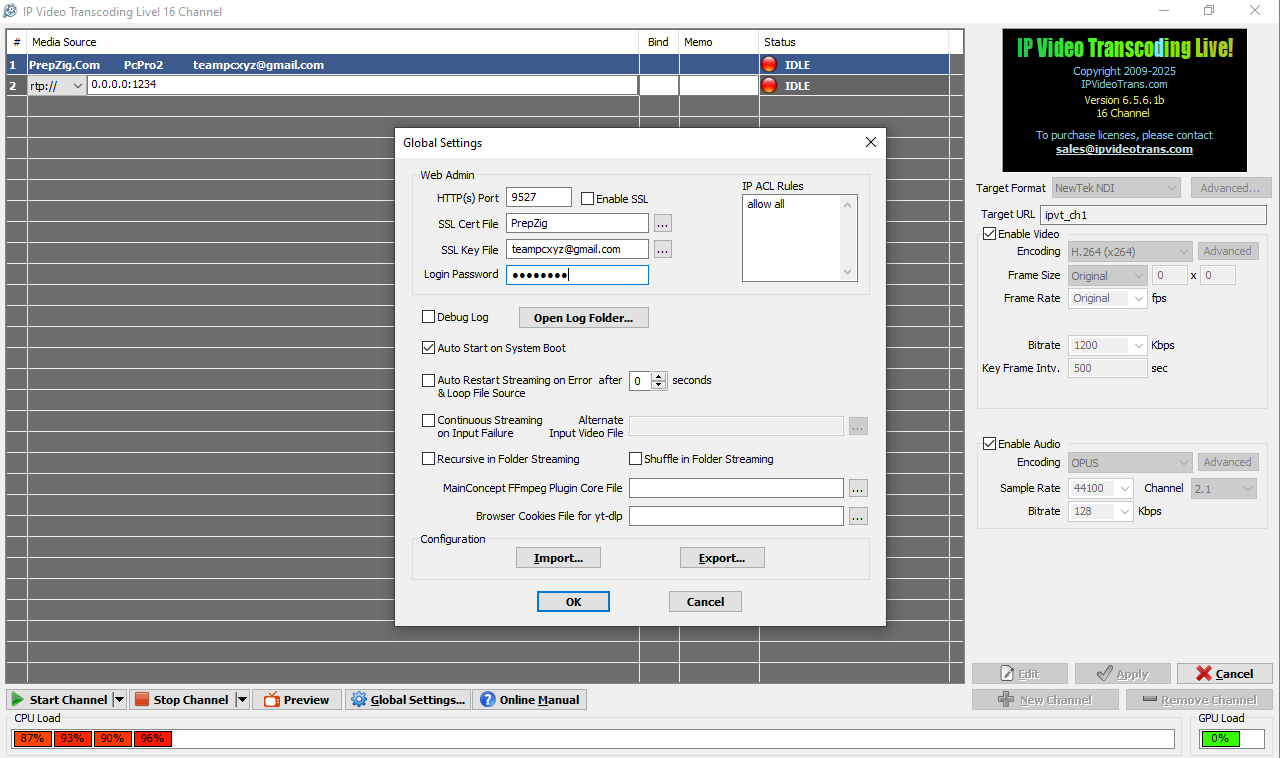
Step 2: Import Media / Setup
After creating a project, the next stage involves importing video sources and configuring input settings. IP Video Transcoding systems support multiple input formats, including live IP streams, satellite feeds, camera sources, media files, and network video transports. During setup, users define input protocols such as RTP, RTMP, SRT, UDP, or HLS. Audio channels, metadata, and stream synchronization settings are also configured at this stage. Proper setup ensures stable signal acquisition, minimizes errors during processing, and provides a strong foundation for high-quality transcoding results.
Step 3: Main Workflow
The core function of IP Video Transcoding is converting incoming video streams into formats optimized for distribution. During the workflow, the system decodes the source stream, processes the video content, and re-encodes it according to the specified output requirements. This may involve changing codecs, reducing bandwidth consumption, adjusting frame rates, or generating multiple adaptive bitrate profiles. Advanced transcoding platforms often support real-time processing, enabling broadcasters and streaming providers to deliver content efficiently across multiple endpoints while maintaining visual quality and reducing network resource usage.
Step 4: Add Features (Effects, Tools, and Customization)
Modern IP Video Transcoding solutions include numerous customization tools that enhance content quality and operational flexibility. Users can apply video scaling, deinterlacing, color correction, logo insertion, watermarking, subtitle integration, and audio normalization. Some systems also offer AI-assisted enhancements, noise reduction, and automated quality optimization. Additional features such as stream monitoring, failover protection, and metadata management improve reliability and workflow control. These customization options allow organizations to tailor video delivery according to branding requirements, technical standards, and audience expectations.
Step 5: Export / Save Output
Once transcoding and processing are complete, the final output streams are generated and delivered to their intended destinations. Export settings typically include codec selection, bitrate control, container formats, and delivery protocols. Outputs may be distributed to content delivery networks, streaming platforms, broadcast systems, cloud storage, or local servers. Adaptive bitrate streaming packages can also be created for HLS or MPEG-DASH delivery. Proper export configuration ensures compatibility with target devices while maintaining efficient bandwidth utilization and consistent viewing experiences across multiple platforms.
Best Use Cases for IP Video Transcoding
IP Video Transcoding serves a wide range of industries and applications where video compatibility and delivery optimization are essential. Some of the most common use cases include:
- Live television broadcasting
- OTT and streaming services
- Video-on-demand platforms
- Corporate video distribution
- Educational streaming systems
- Religious and worship broadcasts
- Remote production workflows
- Sports event streaming
- Government communication networks
- Digital signage systems
Organizations rely on IP Video Transcoding to deliver content efficiently while ensuring viewers receive the best possible experience regardless of device capabilities or network conditions.
Advantages and Limitations
Like any video processing technology, IP Video Transcoding offers numerous benefits while presenting certain challenges. Understanding both aspects helps organizations make informed deployment decisions and optimize workflow performance.
Advantages
One of the biggest advantages of IP Video Transcoding software is its ability to improve compatibility across different devices and platforms. By converting content into multiple formats and resolutions, organizations can reach broader audiences without requiring separate production workflows. Adaptive bitrate streaming support ensures smooth playback under varying network conditions, reducing buffering and improving user satisfaction. Modern transcoding systems also support automation, scalability, cloud integration, and real-time processing, making them valuable for broadcasters and large-scale streaming operations.
Another significant benefit is bandwidth optimization. High-resolution source content can be converted into multiple bitrate profiles that match different network capacities. This reduces delivery costs while maintaining acceptable visual quality. Advanced transcoding platforms also improve workflow efficiency by integrating monitoring, stream management, and redundancy features into a single solution.
Limitations
Despite its advantages, IP Video Transcoding requires substantial processing power, especially when handling multiple high-resolution streams simultaneously. Real-time transcoding of 4K, UHD, or HDR content can place significant demands on hardware resources, increasing infrastructure costs. Organizations must carefully plan system capacity to avoid performance bottlenecks during peak usage periods.
Another limitation involves potential quality degradation during the transcoding process. Each re-encoding operation can introduce compression artifacts if settings are not properly optimized. Additionally, latency may increase in live streaming environments depending on codec complexity, processing requirements, and network conditions. Proper configuration and hardware selection are essential to minimize these challenges.
Alternatives to IP Video Transcoding
Several alternatives can be considered depending on workflow requirements and technical objectives:
- Video Encoding Systems
- Cloud-Based Media Processing Platforms
- Edge Video Processing Solutions
- Adaptive Streaming Servers
- Hardware Video Encoders
- Media Asset Management Platforms
- Content Delivery Network Optimization Tools
- GPU-Accelerated Processing Systems
Each alternative offers unique benefits depending on factors such as scalability, latency requirements, infrastructure preferences, and budget considerations.
Frequently Asked Questions (FAQs)
What is IP Video Transcoding?
IP Video Transcoding is the process of converting video streams from one format, codec, resolution, or bitrate into another to improve compatibility and optimize delivery across various devices and networks.
Why is IP Video Transcoding important?
It enables efficient video distribution, reduces bandwidth usage, improves playback quality, and ensures content can be viewed on different devices and platforms.
Can IP Video Transcoding be used for live streaming?
Yes. Many modern transcoding platforms support real-time processing for live broadcasts, OTT services, sports events, and enterprise streaming applications.
Which video protocols are commonly supported?
Most solutions support protocols such as RTP, RTMP, SRT, UDP, HLS, MPEG-DASH, and various broadcast transport streams.
Does transcoding reduce video quality?
Transcoding can affect quality if aggressive compression settings are used. However, properly configured systems maintain high visual quality while optimizing bandwidth efficiency.
Is cloud transcoding better than on-premises transcoding?
Both options have advantages. Cloud transcoding offers scalability and flexibility, while on-premises systems provide greater control, lower recurring costs, and predictable performance.
Conclusion
IP Video Transcoding plays a vital role in modern video distribution by ensuring content is delivered efficiently, reliably, and in formats suitable for diverse audiences. From live broadcasting and OTT streaming to enterprise communications and educational platforms, transcoding helps organizations optimize video quality while reducing bandwidth consumption. Although it requires processing resources and careful configuration, the benefits of improved compatibility, scalability, and viewer experience make it an essential component of professional video workflows. As demand for high-quality digital content continues to grow, IP Video Transcoding will remain a foundational technology for successful media delivery.
Download
Telegram ID
eMail