JIPEncoder 3.1.8: A Complete Guide to Professional Video Encoding and Media Processing
Introduction
In today’s digital media industry, efficient video encoding is essential for broadcasters, streaming platforms, content creators, and production studios. JIPEncoder is a powerful media encoding solution designed to convert, process, and optimize video and audio files for various distribution platforms. Whether you are preparing content for television broadcasting, online streaming, IPTV services, or archival storage, JIPEncoder provides the tools needed to streamline the encoding workflow. Its flexible configuration options, support for multiple formats, and user-friendly interface make it a practical choice for both beginners and experienced media professionals.
Step 1: Create a New Project
Getting started with JIPEncoder begins by creating a new project. After launching the software, users can initiate a project that serves as the workspace for all encoding tasks. This project-based structure helps organize media files, encoding settings, output destinations, and processing configurations in one location. By setting up a project before importing media, users can maintain a more structured workflow and avoid confusion when working with multiple encoding jobs. This approach is especially beneficial for broadcasters and production teams handling large amounts of media content daily.

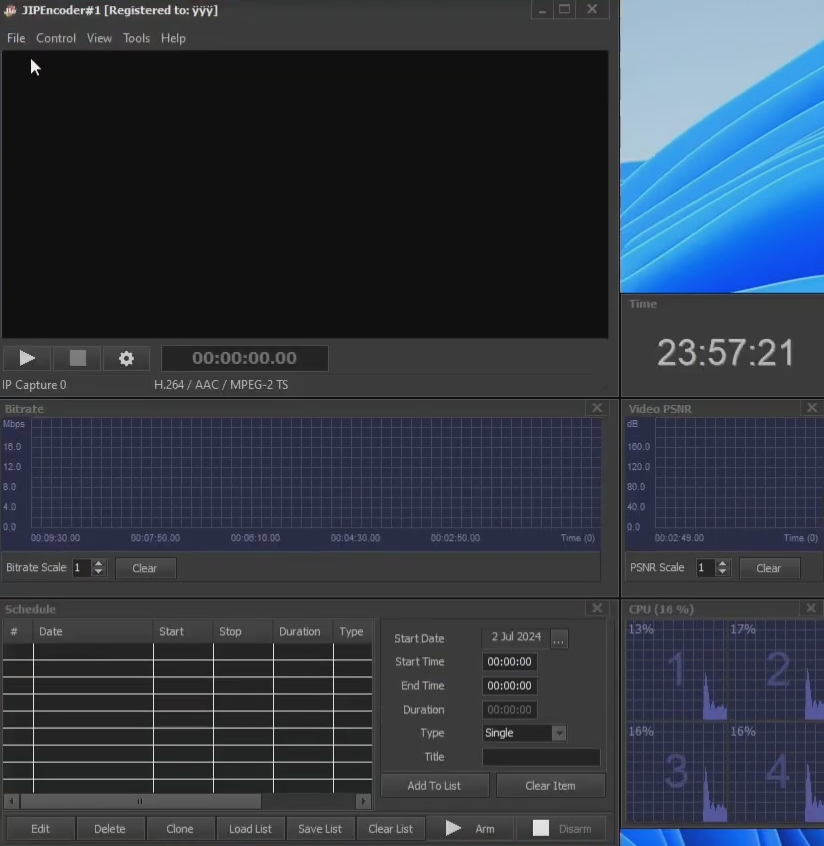
Step 2: Import Media / Setup
Once a project has been created, the next step is importing media files into JIPEncoder. The software typically supports a variety of video and audio formats, making it easy to work with content from different cameras, editing systems, and production environments. During the setup phase, users can define encoding parameters such as resolution, frame rate, bitrate, audio settings, and codec selection. Proper configuration at this stage ensures optimal output quality while maintaining efficient file sizes, making the content suitable for its intended delivery platform.
Step 3: Main Workflow (Editing, Processing, and Encoding)
The core workflow in JIPEncoder revolves around processing media and preparing it for final distribution. After media files have been imported and configured, users can review content, apply necessary processing options, and manage encoding queues. The software is designed to handle both single-file and batch encoding operations, allowing multiple files to be processed simultaneously. This capability significantly improves productivity, particularly in environments where large volumes of media must be converted quickly. Automated workflows and customizable presets further simplify repetitive tasks and help maintain consistency across projects.
Step 4: Add Features (Effects, Tools, and Customization)
JIPEncoder offers a variety of customization options that enhance the encoding process. Users can adjust video quality settings, apply filters, configure advanced codec parameters, and optimize output profiles for specific devices or platforms. Additional tools may include watermarking, metadata editing, audio normalization, subtitle integration, and stream preparation features. These customization capabilities allow organizations to tailor content according to their technical requirements while maintaining professional quality standards. The flexibility provided by JIPEncoder makes it suitable for a wide range of media production workflows.
Step 5: Export / Save Output
After completing all processing and customization tasks, users can export their projects using JIPEncoder’s output tools. The software enables content to be saved in various file formats and delivery standards, depending on the project’s requirements. Before exporting, users can verify encoding settings, preview expected results, and choose output destinations. Once the encoding process begins, progress can be monitored through status indicators and processing logs. The final output is typically optimized for broadcasting, streaming, archiving, or digital distribution, ensuring compatibility across different platforms and devices.
Best Use Cases for JIPEncoder
JIPEncoder is suitable for numerous professional and commercial media applications. Its flexible encoding capabilities make it valuable across different industries and production environments.
Some common use cases include:
- Broadcast content preparation
- IPTV and OTT streaming workflows
- Video-on-demand platform encoding
- Corporate video distribution
- Educational media processing
- Digital archive creation
- Social media video optimization
- Multi-format content conversion
Organizations that require reliable video encoding software often choose JIPEncoder because it can efficiently manage high-volume processing tasks while maintaining consistent output quality.
Advantages and Limitations
Advantages
JIPEncoder provides several benefits that make it appealing to media professionals. One of its primary strengths is its ability to process media efficiently while supporting multiple formats and codecs. The software can simplify complex encoding workflows through automation and customizable presets, reducing manual effort and saving valuable production time. Its scalability makes it suitable for both small production teams and large broadcasting operations. Additionally, the software’s flexible output options allow users to optimize content for a wide variety of platforms without requiring separate encoding solutions.
Limitations
Despite its strengths, JIPEncoder may present certain challenges for some users. Advanced encoding configurations can require technical knowledge, particularly for those unfamiliar with video compression standards and codec settings. New users may face a learning curve when exploring the software’s more sophisticated features. Depending on project complexity and output quality requirements, encoding large files may also require significant system resources. Organizations should evaluate their hardware capabilities and workflow requirements to ensure the software aligns with their operational needs.
Alternatives to JIPEncoder
Several alternative media encoding solutions are available for users seeking different features or workflow approaches. Popular alternatives include Adobe Media Encoder, FFmpeg, HandBrake, Telestream Vantage, Sorenson Squeeze, and AWS Elemental MediaConvert. Each platform offers unique strengths, ranging from open-source flexibility to enterprise-level automation. The best choice depends on factors such as budget, scalability, integration requirements, and technical expertise. Evaluating multiple options can help organizations identify the most suitable encoding solution for their specific production environment.
Frequently Asked Questions (FAQs)
What is JIPEncoder used for?
JIPEncoder is primarily used for video and audio encoding, media conversion, format optimization, and content preparation for broadcasting, streaming, and digital distribution.
Is JIPEncoder suitable for beginners?
Yes. While advanced features may require technical knowledge, basic encoding workflows are generally straightforward and can be learned with practice.
Can JIPEncoder handle batch encoding?
Yes. JIPEncoder is designed to process multiple files simultaneously, helping users improve efficiency and reduce processing time.
Does JIPEncoder support multiple output formats?
Yes. The software typically supports a variety of output formats, codecs, resolutions, and bitrate configurations to meet different distribution requirements.
Is JIPEncoder useful for streaming workflows?
Absolutely. Many organizations use JIPEncoder to prepare content for IPTV, OTT platforms, live streaming services, and video-on-demand applications.
Conclusion
JIPEncoder is a versatile media encoding solution that helps professionals manage video and audio processing tasks efficiently. Its combination of flexible encoding settings, automation capabilities, format support, and workflow customization makes it valuable for broadcasters, content creators, streaming providers, and media organizations. Whether you need to convert files, optimize content for online distribution, or streamline large-scale encoding operations, JIPEncoder provides a reliable platform to accomplish those goals. By understanding its features, advantages, limitations, and practical applications, users can determine whether JIPEncoder is the right solution for their media production workflow.
Download
Telegram ID
eMail