Overview of Ross XPression Studio 12.5 Build 6133
In the world of live broadcasting and video production, high-quality graphics play a crucial role in engaging audiences. Ross XPression Studio is a powerful real-time motion graphics and broadcast design tool widely used by TV stations, sports networks, and production studios.
This software is designed to create stunning on-air visuals, including lower thirds, tickers, virtual sets, and 3D animations. Whether you are working in news production or live sports broadcasting, Ross XPression Studio provides a professional environment for creating dynamic visuals.
With increasing demand for high-end broadcast graphics, Ross XPression Studio stands out as a reliable and scalable solution for both small studios and large broadcasting networks.
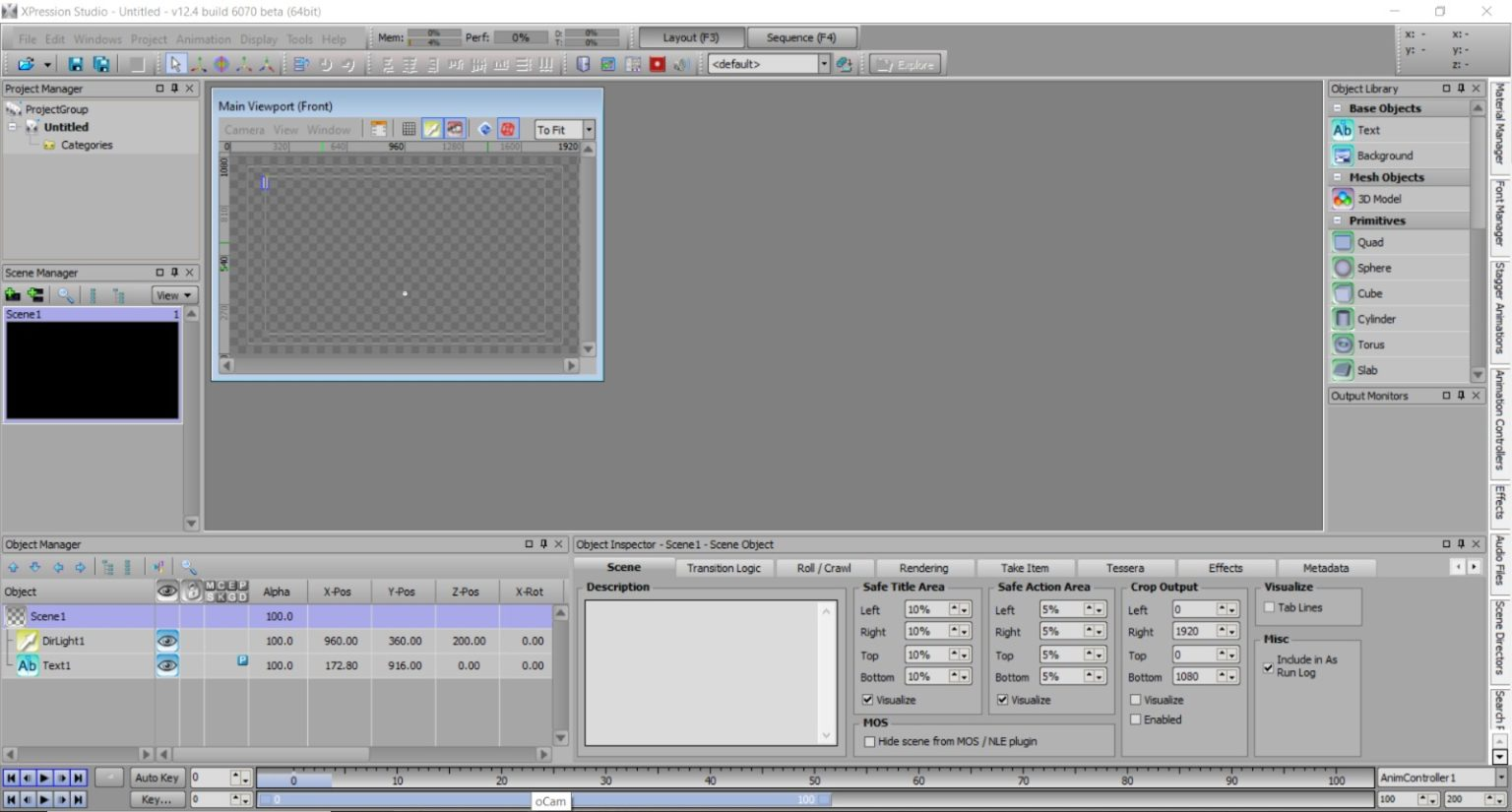
Key Features of Ross XPression Studio 2026
Ross XPression Studio offers a wide range of advanced features that make it a top choice for professionals.
Real-Time Motion Graphics
- Create and render graphics instantly during live broadcasts
- Supports 2D and 3D animation workflows
Data-Driven Graphics
- Integrates with live data sources
- Automatically updates graphics such as scores, statistics, and news feeds
Advanced Rendering Engine
- High-performance rendering for smooth visuals
- Supports high-resolution output including HD and 4K
Customizable Templates
- Design reusable templates for faster production
- Maintain consistent branding across broadcasts
Virtual Sets and Augmented Reality
- Build immersive virtual environments
- Enhance productions with AR elements
These features allow creators to deliver visually engaging and professional broadcasts.
What’s New in Latest Version
The latest version of Ross XPression Studio introduces several improvements that enhance performance and usability.
- Improved rendering speed for real-time graphics
- Enhanced support for modern GPU technologies
- Better integration with newsroom and automation systems
- Updated interface for improved workflow efficiency
- Stability improvements and bug fixes
These updates ensure smoother operation, especially in high-pressure live broadcasting environments.
System Requirements
Before installing Ross XPression Studio, ensure your system meets the following requirements.
Minimum Requirements
- Operating System: Windows 10/11
- Processor: Intel Core i5 or equivalent
- RAM: 8 GB
- GPU: Basic graphics card with DirectX support
- Storage: 20 GB free space
Recommended Requirements
- Processor: Intel Core i7 or higher
- RAM: 16 GB or more
- GPU: Dedicated high-performance graphics card
- Storage: SSD for faster performance
A powerful system ensures smooth rendering and real-time performance.
Installation Guide
Installing Ross XPression Studio is straightforward if you follow these steps:
- Obtain the official installation package
- Run the installer and follow on-screen instructions
- Accept the license agreement
- Choose installation location
- Complete setup and launch the software
Make sure your graphics drivers are updated for optimal performance.
How to Use Ross XPression Studio: A Quick Start Guide
Step 1: Create a New Project
Open the software and create a new project. Set your resolution, frame rate, and output format based on your production needs.
Step 2: Import Media / Setup
Import images, videos, and other assets. Set up data sources if you plan to use dynamic content.
Step 3: Main Workflow (editing/design/etc.)
Design your graphics using built-in tools. Arrange layers, animations, and transitions to create engaging visuals.
Step 4: Add Features (effects/tools/customization)
Enhance your project with effects, lighting, and 3D elements. Customize templates to match your branding.
Step 5: Export / Save Output
Render your graphics or integrate them into live broadcasts. Save your project for future use.
Best Use Cases for Ross XPression Studio
Ross XPression Studio is suitable for a variety of professional applications:
- Television news production
- Live sports broadcasting
- Corporate video presentations
- Event production and live shows
- Streaming and digital media content
Its flexibility makes it ideal for both live and pre-recorded productions.
Advantages and Limitations
Advantages
- Real-time rendering for live broadcasts
- Powerful 2D and 3D graphics capabilities
- Integration with live data sources
- Professional-grade output quality
- Scalable for small and large productions
Limitations
- Requires high-performance hardware
- Learning curve for beginners
- Premium licensing may be required
Alternatives to Ross XPression Studio
If you are exploring other options, consider these alternatives:
- Vizrt – Advanced broadcast graphics solution
- Adobe After Effects – Motion graphics and visual effects software
- NewBlue Titler Live – Live titling and graphics tool
- vMix – Live production software with graphics features
Each alternative offers different strengths depending on your workflow.
Frequently Asked Questions (FAQs)
What is Ross XPression Studio used for?
It is used for creating real-time broadcast graphics, animations, and virtual sets.
Is Ross XPression Studio suitable for beginners?
Yes, but beginners may need time to learn its advanced features.
Can it be used for live broadcasting?
Yes, it is specifically designed for real-time graphics in live broadcasts.
Does it support 3D graphics?
Yes, it supports both 2D and 3D graphics creation.
Is Ross XPression Studio worth it?
For professional broadcasting, it is a powerful and reliable solution.
Conclusion
Ross XPression Studio is a high-performance tool designed for creating professional broadcast graphics and real-time visual content. Its advanced features, real-time rendering capabilities, and integration options make it a top choice for broadcasters and production teams.
While it may require a powerful system and some learning, the results it delivers are exceptional. Whether you are working in television, sports, or live events, Ross XPression Studio provides the tools needed to create visually stunning and engaging content.
Download
Telegram ID
eMail